Editorial
Guide
Is AI Making Your Organization More Productive or More Dependent?


Every CIO I have spoken to in the past 18 months mentions the same points: “We are piloting GenAI.” “We're standing up a center of excellence.” “We're going to be AI first by 2027.”
When I look across 34 enterprise engagements from over the past year, a hard truth emerges. CIOs slip into AI glitches more often than not, and the ones who succeed are the ones who know what to avoid.
If you are an executive trying to figure out why your AI program is underperforming, here are my insights from the field, illustrated with anonymized composites from real deployments.
Last fall, I talked to the CIO of a regional specialty finance lender who had just signed a six-figure enterprise AI deal: numerous users, dozens of large scale use cases and a glowing executive sponsor.
Six months later, I checked in with him: two workflows built and surprisingly none of them were in production.
Unfortunately, this is not an anomaly among organizations trying to implement AI. That’s because the executive who signed the contract is not the person who has to do the actual work. The signer hands the program to a director who already has a day job, and the project starves to death by a thousand competing priorities. Identifying builders (AI champions within the organization who are personally excited and have incentive to be part of the initiative) is a key priority that most may neglect.
| Lesson: If the executive sponsor cannot name the three people who will start building the first three workflows, do not sign. |
|---|
Related Article: Who Should Be Building Agentic AI Inside Your Organization?
The fastest way to scale AI across an organization is actually not starting by implementing AI everywhere at once. I saw one construction firm roll out their HR chatbot to 2,000 employees on day one. Adoption peaked the first week and never recovered starting from day four, because nobody owned anything and no single team had a workflow that mattered to them or helped their team’s KPIs.
Compare that to a mid-market bank that gave access to only 14 people in one department (HR). They picked workflows everyone in the room already hated doing, which in their case was expense approval and document processing.
After a few weeks, those agents went viral within the organization and many employees became repeat users because they saw their colleagues complete the same tasks with a fraction of the time they were spending. Within three months, other departments were asking to get access and the velocity and morale building made it worth more than any massive internal launch campaign or announcement.
| Lesson: Start with one department that has real pain and a leader who wants the fastest time to value with AI implementation. Expansion driven by envy beats expansion driven by mandate. |
|---|
I have worked with many enterprise leaders, particularly in healthcare, who came to a meeting with dozens of use cases for AI ranked by projected ROI. Though it makes sense to focus on projects with the highest value, lists like these are usually fatal. The team, like many of their peers, tried to scope all of them at once and ended up with nothing in production by the end of three months.
The winners here picked just three use cases. Not the three most ambitious, rather, the three most achievable:
Use cases such as deal memos formatted to a template, earnings call summaries with a fixed schema and KYC document extraction. All of these use cases are boring, repetitive and measurable. Implementing three quick wins bought the credibility and patience to go after more advanced, multi-step and human-in-the-loop workflows later on.
| Lesson: Choose three use cases you can ship in the first 90 days to get the ball rolling and solve more advanced problems later. |
|---|
Earlier this year, I worked with an engineering firm who was shocked to discover they had built the same invoice processing agent four times. Multiply that across a large enterprise and you are paying your best people to redo each other's work.
The solution might not sound exciting, but it is decisive: a central grid where every internal agent is published, discoverable and reusable, similar to an internal app store or marketplace. The companies that made sure this was part of their strategy (knowing where end users can access agents in production) saw higher adoption, because employees actually knew what tools were out there.
| Lesson: Make sure to set up a shared registry of AI agents before you have 10 of them, not after you deploy a hundred. |
|---|
One financial services firm I consulted with had just bought a developer-focused platform that connected to almost nothing they used. Every workflow needed custom API plumbing to reach Salesforce, Outlook or their document store. Each integration added weeks, and the backlog of requests became the program's biggest bottleneck.
Firms with the highest level of adoption do something entirely different. They choose platforms based on a simple question: does this connect today to the applications where our people actually do their work? AI agents that live outside Email, CRM, ticketing, file storage and ERP systems are massively limited in their utility. However, an AI workflow that can read, write, search and execute across your enterprise’s tools and apps is the one that people will be excited to use.
| Lesson: Evaluate the integration catalog before you commit. AI should work where your team works. |
|---|
With rapid evolutions in the AI industry, fear can often be a major deciding factor, especially when sensitive customer or patient data is involved. Nobody wants to be the person who caused a data incident, so they keep doing things manually as if AI does not exist.
The companies that broke through took the fear and uncertainty seriously instead of treating it as a change management problem. They chose a platform that met all security and compliance standards and had rigorous governance built in: role-based permissions, full audit trails on every run, guardrails on what data each agent can touch, human approval steps and clear answers on where data lives and what it's used for. When employees can see exactly what an agent did, what it accessed and who signed off, the fear gets replaced by trust.
| Lesson: Adoption is a function of safety and a multilayered governance approach is nonnegotiable when it comes to highly regulated industries like healthcare and financial services. |
|---|
Related Article: The Pilot Paradox: Why Enterprise AI Complexity Grows Exponentially
The pattern of the winners is consistent when I reflect on my experience helping IT and tech leaders deploy AI systems that actually work for them:
The companies that do these things see production AI agents in the high double digits within six months, run rates in the millions of executions per quarter and measurable profit and loss impact. The companies that build two workflows and force everyone in the organization to use them tell the board next year that AI did not live up to the hype.
AI agents can hallucinate or contain hidden biases in their algorithms. Some notable examples of AI gone wrong include:
The 30% rule for AI is a concept that claims users do not need to be experts in AI to use it effectively as a tool. Instead, they only need to be familiar with around 30% of the core concepts — just enough digital literacy to take advantage of the technology. The idea was developed by Harvard Business School professor Tsedal Neeley.
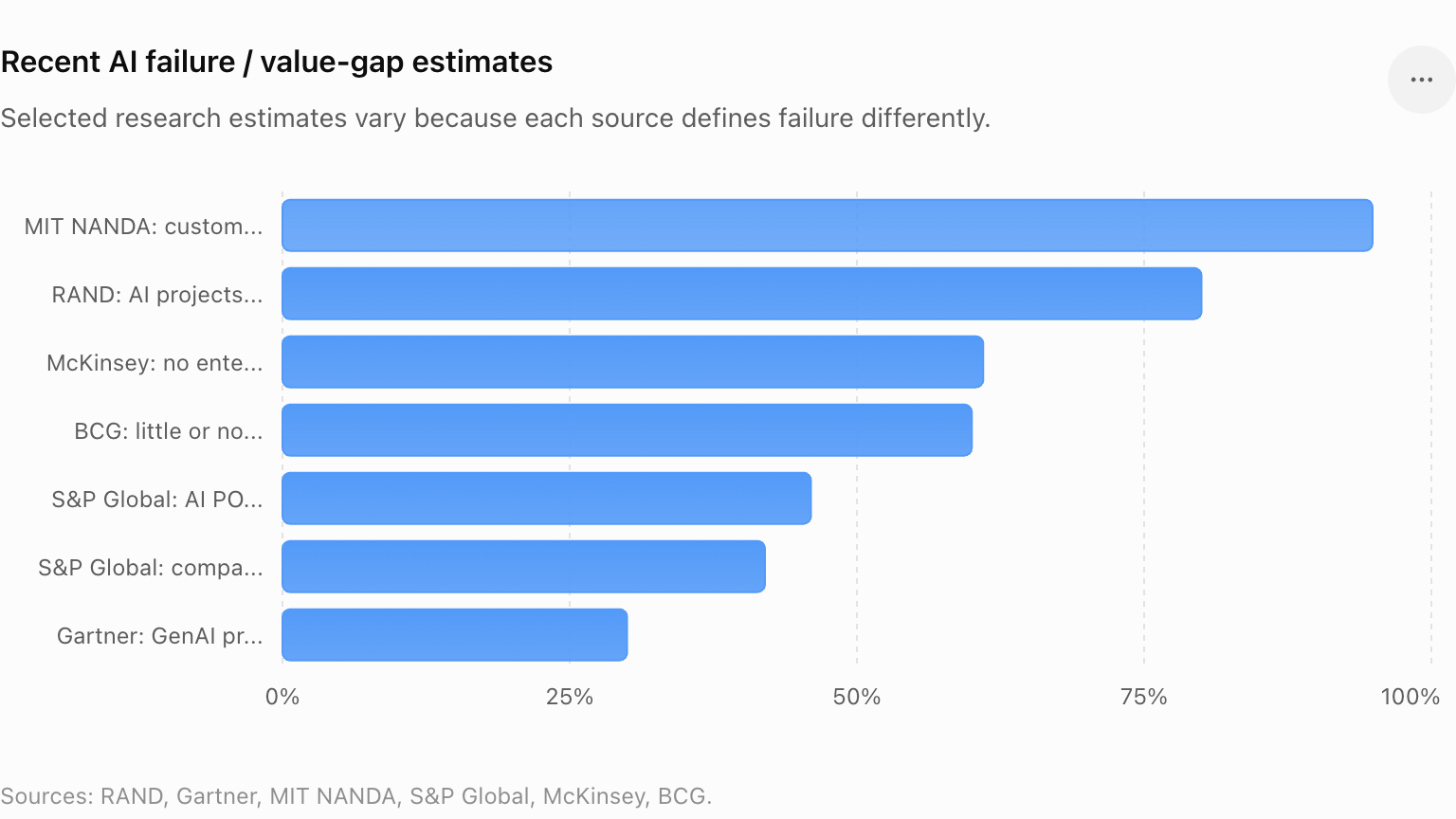
AI deployments fail somewhere between 30% and 95% of the time, depending on how "fail" is defined and which data sources you're looking at. MIT, for example, found 95% of AI initiatives failed to show any type of measurable impact on profit and loss. RAND estimated that around 80% of AI projects fail. And Gartner claims at least 30% of AI projects are abandoned after proof of concept.
Good AI use cases are those that are routine and easily repeatable. They should also be tasks that are easy to measure for success. Some potentially good AI use cases include:
 Learn how you can join our contributor community.

Hakan Gureren is the Enterprise AI Solutions Senior Manager at StackAI, a platform where enterprises can build, test and govern AI agents. He leads market research, competitive intelligence, go to market strategy and has personally engaged with hundreds of CIOs, CTOs, and Chief AI Officers across financial services, real estate, healthcare, manufacturing, construction and government.