Feature
Guide
Is AI Making Your Organization More Productive or More Dependent?


Over the past year, large language models (LLMs) have moved from experimental tools to core components in enterprise workflows, powering everything from customer support to software development and internal knowledge retrieval. Among the most widely adopted are Anthropic’s Claude and OpenAI’s ChatGPT, two platforms that often appear to be similar on the surface but behave differently once they are deployed.
Enterprises are increasingly moving away from standardizing on a single model, instead routing tasks based on each model’s strengths and use cases.
In this article, I take a look at how ChatGPT and Claude differ in practice across key enterprise considerations, including: reasoning, accuracy, safety and usability.
This table summarizes how ChatGPT and Claude differ across core enterprise criteria, including positioning, strengths, integration models, and ideal use cases.
| Category | ChatGPT | Claude |
|---|---|---|
| Core Positioning | Orchestration-focused platform with strong ecosystem integration | Execution-focused system with deep reasoning and contextual interaction |
| Primary Strength | Structured reasoning and workflow coordination | Long-context reasoning and controlled task execution |
| Enterprise Fit | Heterogeneous systems and multi-step workflows | Document-heavy, execution-focused environments |
| Integration Model | Extensive APIs, tools and orchestration layers | APIs, connectors and MCP-driven system interaction |
| Failure Profile | More likely to provide confident responses under uncertainty | More likely to express uncertainty or decline when confidence is low |
| Best For | Workflow automation and cross-system orchestration | Deep reasoning and controlled task execution |
Large language models are already embedded in enterprise workflows, but most brands still struggle to translate usage into measurable value.
In practice, usage patterns have already diverged based on the goals of a business. Dmytro Negodiuk, fractional AI officer at Negodiuk AI Consulting, broke his usage of the two platforms down:
"They're not interchangeable," said Negodiuk.
Some business — like Intercom and Klarna — claim faster response and resolution times through AI-assisted support. However, those gains tend to come from augmenting human agents or automating routine interactions rather than fully replacing support teams.
Still, measurable impact remains limited. A 2026 report from SHRM, which surveyed 5,875 US workers, found that employees who use AI reported saving an average of six hours per week, or roughly 26 hours per month. But, those same employees also reported spending four hours per week reviewing and correcting AI outputs.
While preliminary results are there, there is still a gap between adoption and meaningful productivity gains. That gap, however, is not access. It is proficiency — or the lack thereof.
At a surface level, ChatGPT and Claude have much in common. In production, they behave like different platforms.
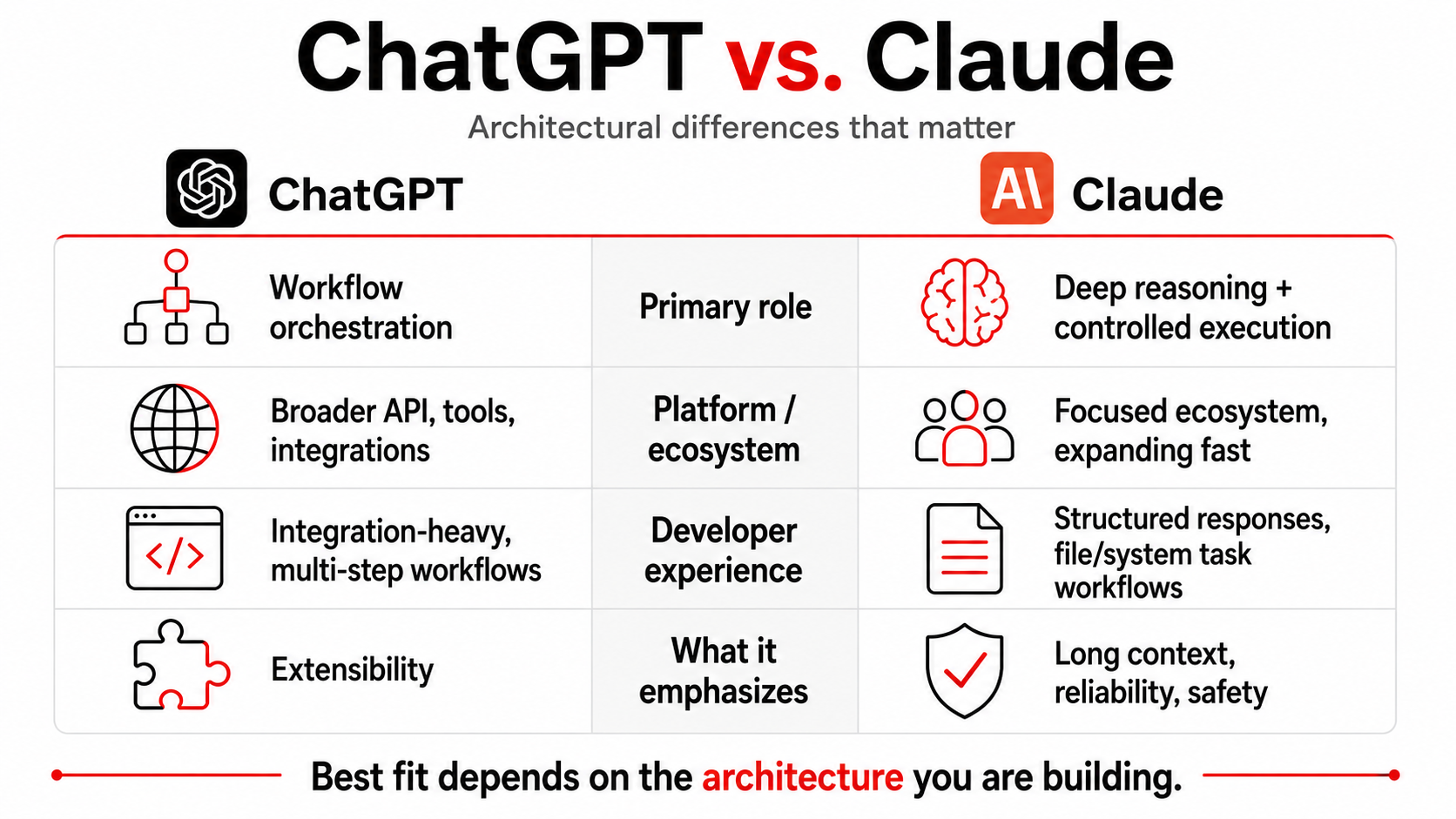
ChatGPT is built for extensibility. OpenAI has developed a broader ecosystem around APIs, function calling and integrations, allowing it to operate inside multi-step workflows that retrieve data, trigger actions and coordinate across systems. While this comparison focuses on chat-based interactions, ChatGPT is often used in production as part of an orchestration layer rather than a standalone model.
Claude is designed with a strong emphasis on long-context reasoning, output reliability and controlled, structured responses. Its large context window allows it to process extensive documents, maintain coherence across long interactions and support complex multi-step analysis within a single session. Anthropic provides a full API with tool use, function calling and MCP (Model Context Protocol) support, enabling Claude to operate within agentic workflows and connected systems. In practice, it is widely used in enterprise environments where consistency, safety and predictable output behavior are critical.
The developer experience is where these differences really come to light.
OpenAI’s ecosystem is more mature, with extensive tooling and integrations that make it easier to embed into existing systems and orchestrate multi-step workflows. Anthropic’s ecosystem has historically been more focused, but it is evolving quickly with capabilities such as Claude Code and Cowork, which extend the model beyond chat into agent-driven workflows that can operate directly on files and systems. In practice, OpenAI remains more integration-heavy, while Anthropic is increasingly oriented toward controlled, task-level execution within defined environments.
Iteration cadence reflects different priorities rather than speed. OpenAI frequently introduces new integrations and platform features, while Anthropic continues to release new capabilities at a steady pace, often emphasizing reliability, safety and guardrails.
In practice, the distinction is still clear. ChatGPT is typically used to orchestrate workflows across systems, while Claude is often used for deep reasoning and, increasingly, for controlled task execution within defined environments. The choice is primarily about which fits the architecture you are building.
ChatGPT prices range from free to $100/month for individuals, depending on the selected plan.
| Plan | Cost | Available Features |
|---|---|---|
| Free | $0/month | Limited access to GPT-5.5 Instant, limited messages & uploads, limited and slower image generation, limited memory and context, limited Codex access |
| Go | $8/month | Everything in free, plus more access to GPT-5.5 Instant, messages, uploads and image creation, as well as longer memory |
| Plus | $20/month | Access to GPT-5.6, expanded messages and uploads, image creation, deep research, memory and context, projects, scheduled tasks, custom GPTs, Codex usage and early access to new features |
| Pro | $100/month | Everything in Plus, along with access to GPT-5.6 Sol Pro, faster image generation, maximum deep research, maximum memory and context and research preview of new features |
For enterprise deployments, pricing is typically usage-based and tied to API consumption, with costs scaling based on tokens, model selection, and the complexity of workflows. This makes ChatGPT flexible for experimentation, but cost predictability can vary depending on how systems are designed and how frequently they are called.
ChatGPT delivers strong performance across structured reasoning, workflow orchestration and integration into enterprise systems.
| Category | Details |
|---|---|
| Best For | Workflow automation, orchestration, structured reasoning |
| Not Ideal For | Very long-context document-heavy analysis |
| Speed | Fast and consistent across structured tasks |
| Accuracy | Strong reasoning clarity; errors often visible |
| Integration | Extensive APIs, tools, and orchestration capabilities |
| Unique Capabilities | Tool use, workflow automation, agent-based systems |
Claude prices range from free to $100/month for individual users, depending on your chosen plan.
| Plan | Cost | Available Features |
|---|---|---|
| Free | $0/month | Code generation, data visualization, content creation and editing, web search, conversation memory, Slack and Google Workspace connections, integrations via MCP |
| Pro | $17/month | Everything in free, plus access to Claude Cowork, Claude Code, Claude Design, Claude Science, Research, Claude for Microsoft 365 and ability to use more Claude models |
| Max | $100/month | Everything in Pro, plus higher output limits, early access to advanced features and priority access during high traffic times |
For enterprise use, Claude pricing is primarily usage-based through its API, with costs driven by token consumption and model selection. Because Claude is often used in long-context workflows such as document analysis, pricing tends to scale with input size rather than the number of discrete calls. In practice, this can make costs more predictable in analysis-heavy environments, but potentially higher for workloads that rely on large inputs or extended context windows.
| Category | Details |
|---|---|
| Best For | Document analysis, knowledge workflows, execution tasks |
| Not Ideal For | Highly dynamic orchestration across many external systems |
| Speed | Consistent, especially with large context inputs |
| Accuracy | Strong contextual understanding and structured reasoning |
| Integration | Connectors, MCP, and environment-based execution |
| Unique Capabilities | Long-context processing, controlled task execution |
To test how each model handles long-form reasoning, we provided both platforms with the same document, a Forrester research report titled How AI Will Accelerate the Green Market Revolution, and gave each platform the same task:
| Summarize this document for an enterprise audience. Focus on key arguments, risks and implications. Keep the summary structured and concise. |
|---|
Here was ChatGPT’s response:
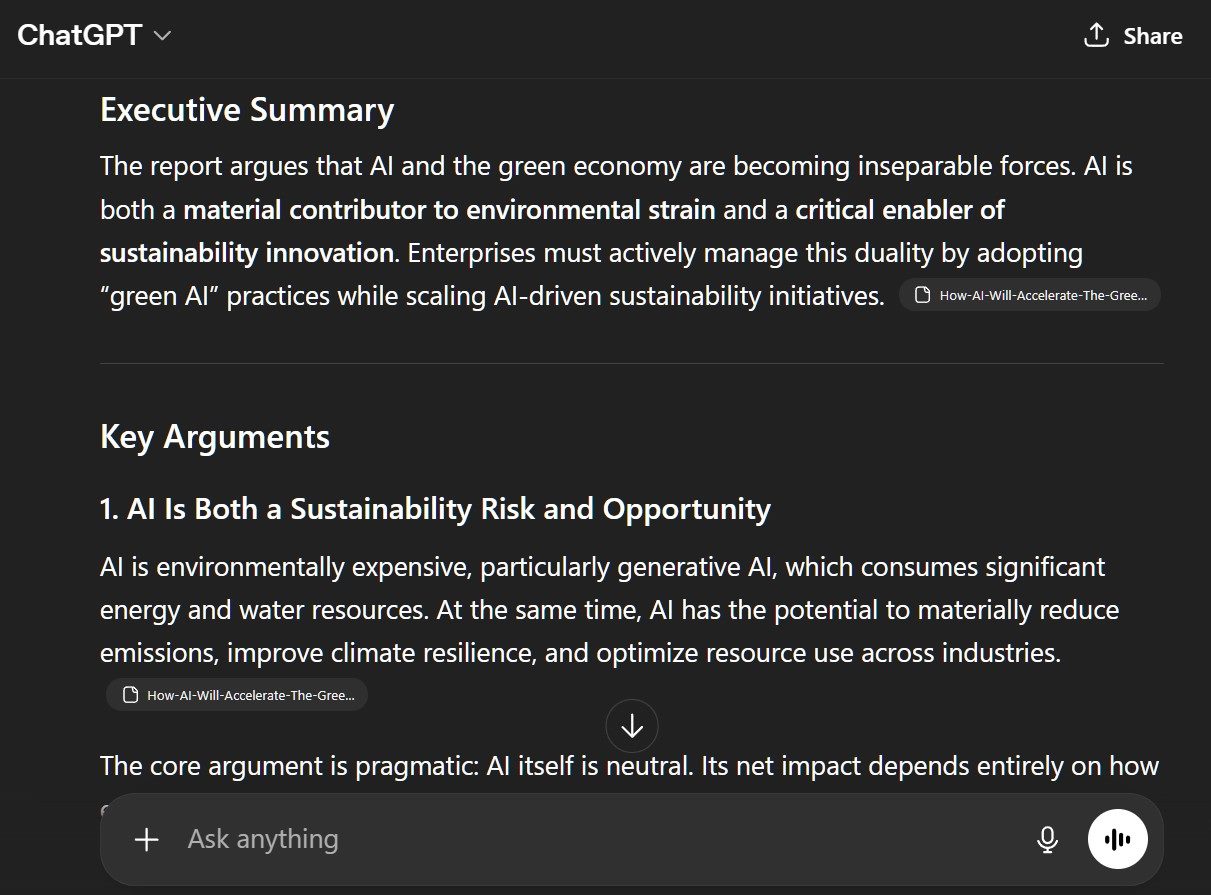
ChatGPT produced a clear and well-organized summary that emphasized explanation and flow over strict structure. The response connected key ideas effectively, but presented them in a more narrative format rather than segmenting them into discrete sections. This made it easy to read, though slightly less rigid in how the document’s components were broken down.
Next, we asked Claude the same question about the document. Here was Claude’s response:
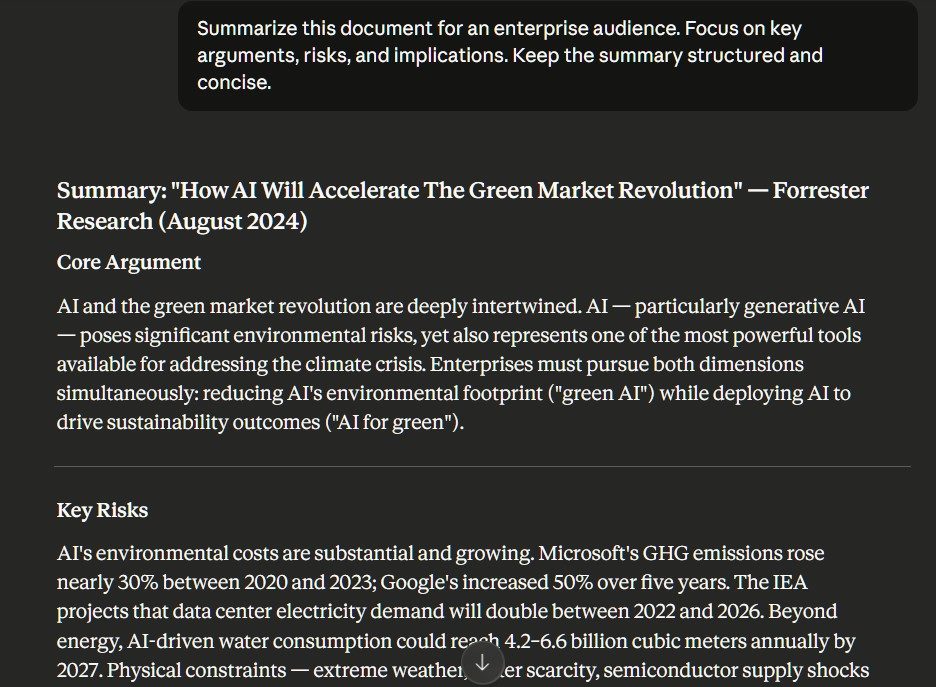
Claude produced a highly structured, report-style summary with clearly defined sections and consistent segmentation across the document. It preserved the hierarchy of ideas effectively, breaking down risks, opportunities and strategic implications in a way that closely mirrored how an analyst might interpret the material.
The result felt less like a narrative explanation and more like a systematic reading of the document.
To evaluate how each model handles uncertainty, we provided both ChatGPT and Claude with the same ambiguous prompt about replacing a customer support team with AI, then introduced a second prompt adding regulatory constraints. Initially, we asked them:
| A company is considering replacing its customer support team with AI. Based on best practices, what should it do? |
|---|
Here was ChatGPT’s response:
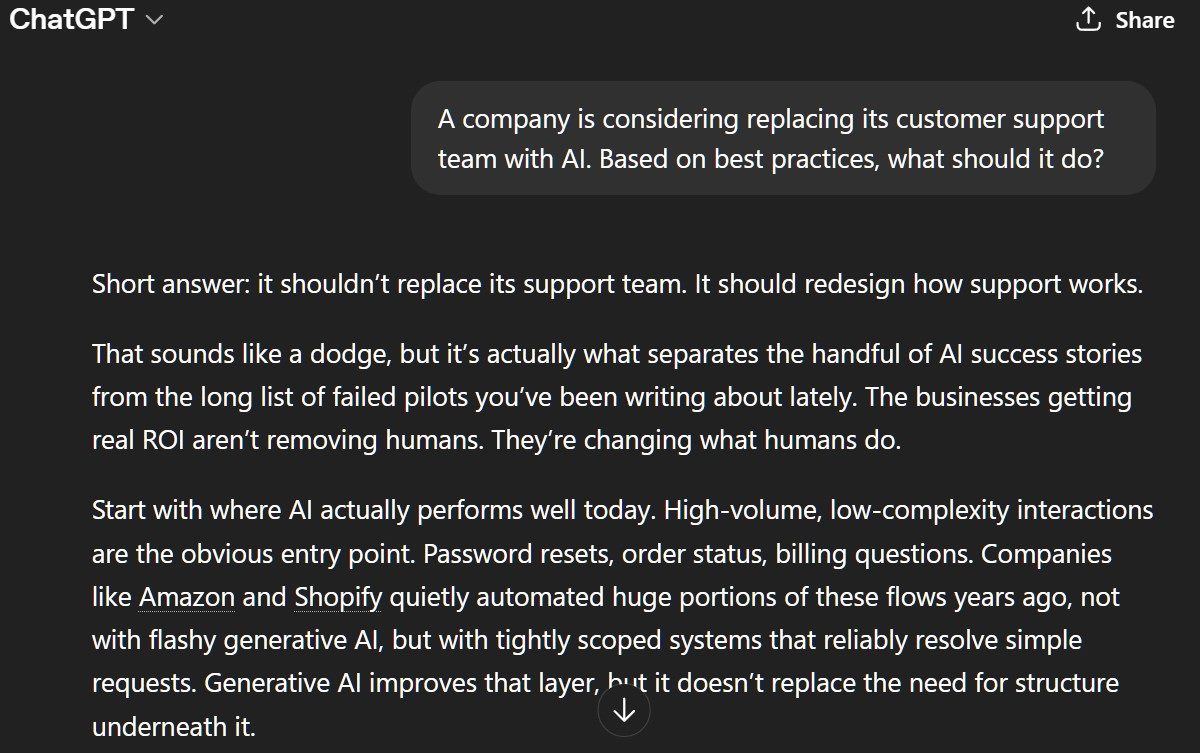
When Claude was asked the same question, here was its response:
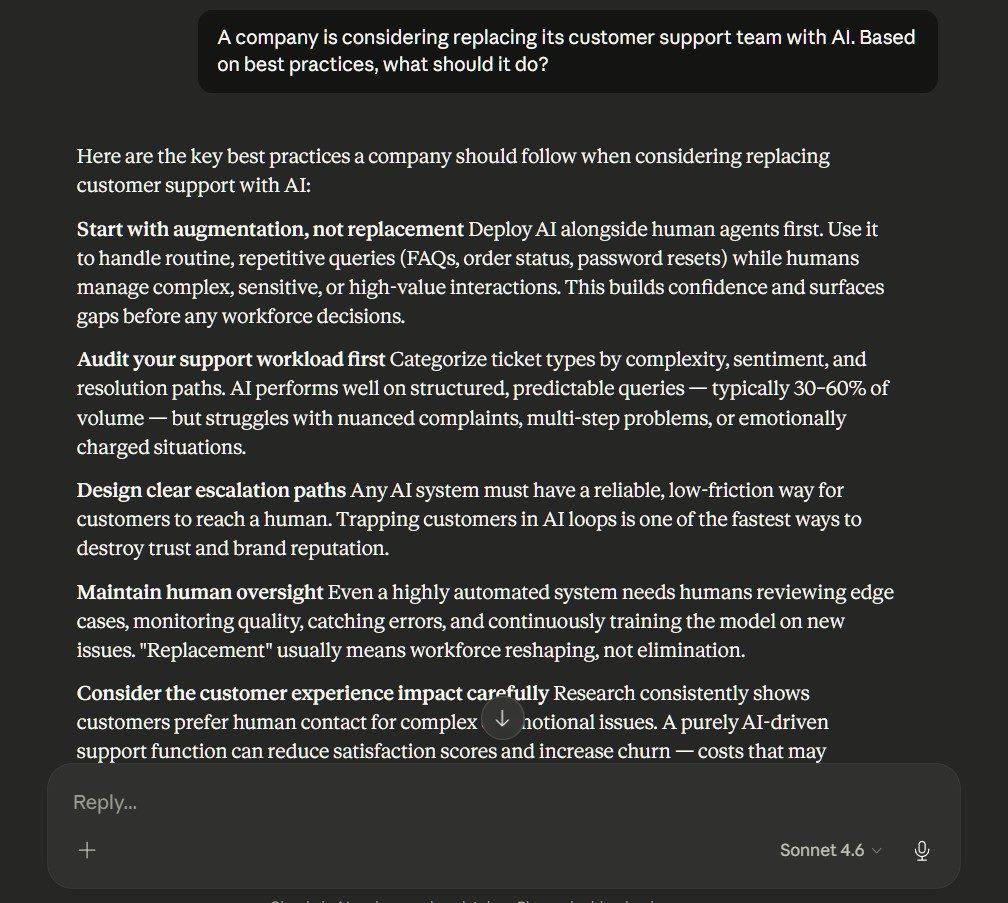
Reliability is where differences between models become visible in production, particularly in how they handle uncertainty.
“Claude will say it doesn’t know. ChatGPT will give an answer that it’s confident in, even if it’s not correct," said Guido Tebano, CMO at Market My Market, a digital marketing agency.
To test that distinction, we provided both models with the same ambiguous prompt about replacing a customer support team with AI, then introduced a second prompt adding regulatory constraints:
| Now assume the company operates in a heavily regulated industry. What changes? |
|---|
Here was ChatGPT’s response to the second question as follows:
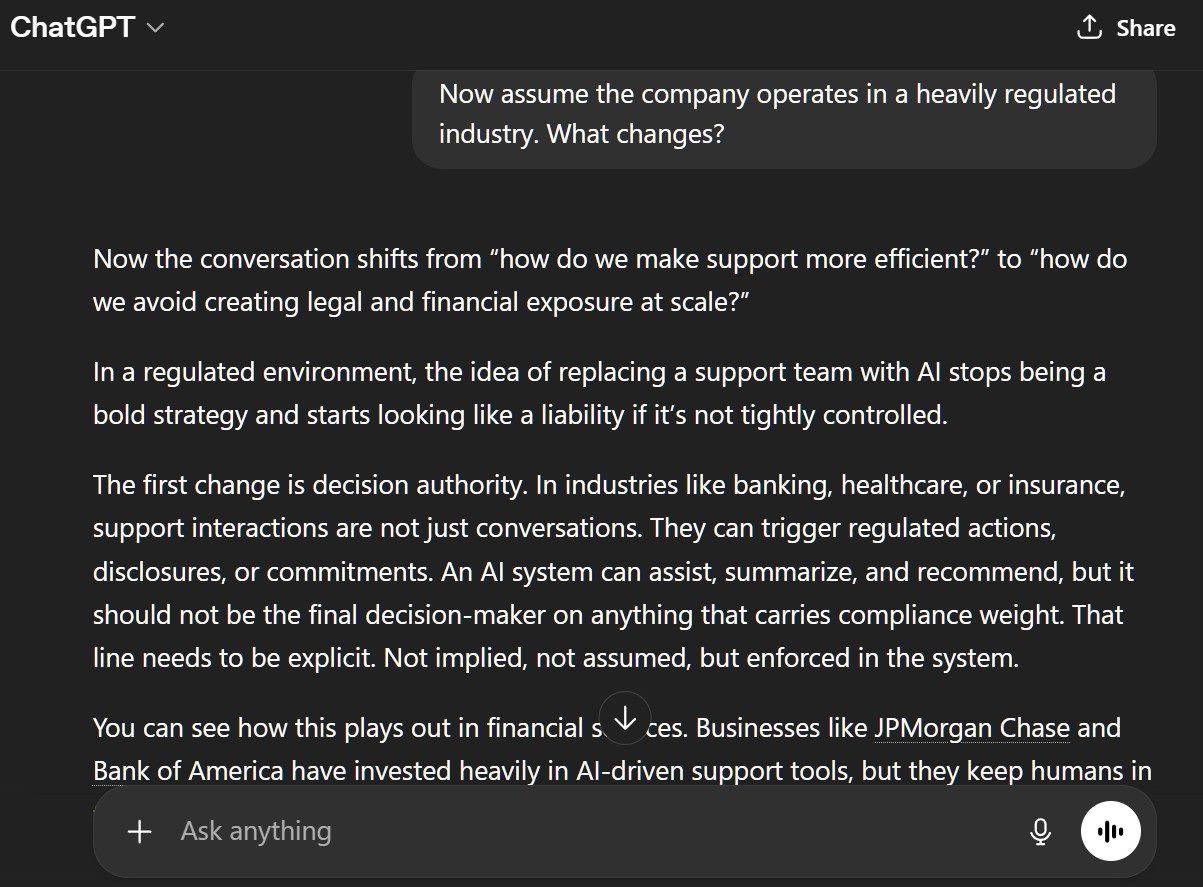
ChatGPT produced a highly structured and directive response, offering clear recommendations without hesitating in the face of ambiguity. When regulatory constraints were introduced, it expanded naturally into governance, auditability and risk segmentation while maintaining a confident, action-oriented tone. However, the response relied on implicit assumptions about the business environment and did not explicitly qualify uncertainty.
And here is Claude's response to the second question:
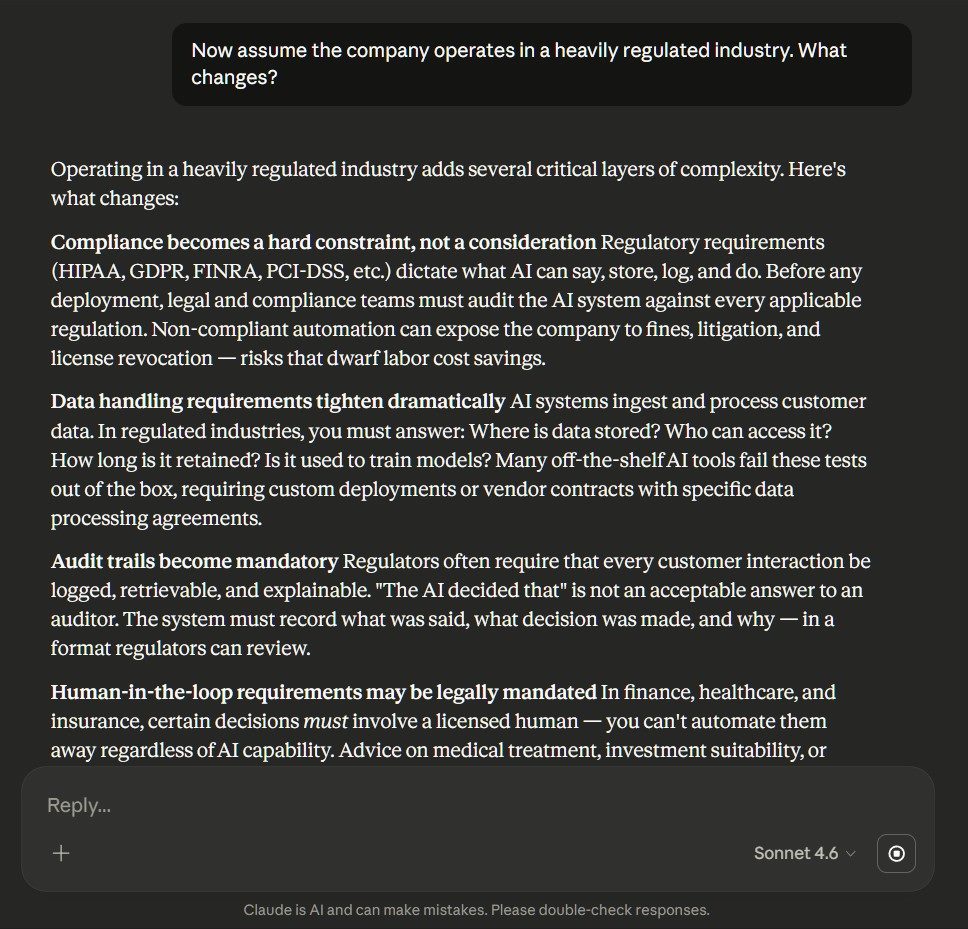
Claude produced a more cautious and structured response, explicitly framing recommendations within constraints such as compliance, data handling and regulatory oversight. When the scenario shifted to a regulated environment, it emphasized limitations, auditability and legal exposure, using more conditional language and clearly defining where AI could not operate independently. The result felt more risk-aware and controlled, with a stronger focus on boundaries than execution.
The differences between ChatGPT and Claude become most meaningful when mapped to specific use cases, where each model’s strengths align with distinct types of work.
For development workflows, the difference comes down to orchestration versus execution.
ChatGPT is better suited for environments that require coordinating multiple tools, generating code within broader workflows and integrating with APIs and external systems. It performs well in prototyping, debugging and building automated pipelines where multiple steps must be chained together.
Claude, particularly with capabilities such as Claude Code and system-level interaction, is increasingly effective for executing tasks directly within development environments. It is well suited for working with files, managing structured codebases and performing controlled operations where precision matters more than flexibility.
For enterprise deployments, integration strategy and governance matter more than model capability.
ChatGPT fits well in environments that require cross-system orchestration, automation and integration with existing infrastructure. Its ecosystem makes it easier to embed into complex workflows that span multiple tools and services.
Claude is often better suited for workflows that prioritize controlled execution, particularly in document-heavy environments or where tasks must be performed within defined systems. In regulated environments, consistency often matters more than flexibility.
“Claude is safer if you are a regulated customer experience company or providing replies that are sensitive to your brand’s messaging,” said Rubén Medina, head of marketing and sales at Koalenda
For creative workflows, differences appear in how each model supports iteration and tone.
ChatGPT generally performs better in brainstorming, drafting and refining narrative structure across multiple iterations. It is well suited for writing tasks, content creation and conversational exploration.
Claude is effective when creative work is grounded in structured inputs or large reference materials. It performs well when consistency, tone control, and maintaining context across longer inputs are more important than rapid iteration.
For conversational and real-time interaction, responsiveness and adaptability are key.
ChatGPT’s conversational flow and flexibility make it well suited for interactive use cases, including voice assistants and mobile applications where responses must feel natural and adaptive. OpenAI has deployed GPT-Live voice models in ChatGPT that support more natural, real-time interactions.
Claude can support these use cases, but its strengths are more pronounced in structured, task-oriented interactions rather than open-ended conversational dynamics.
ChatGPT performs well in structured reasoning, synthesis and summarization, especially when analysis needs to be integrated into broader workflows or connected to external tools and systems.
Yes, a company can use ChatGPT and Claude together by routing different tasks to the model best suited to each workload. For example, ChatGPT may handle cross-system automation, tool use and interactive workflows, while Claude processes long documents, performs structured analysis or completes tightly defined tasks.
A multi-model strategy can improve performance and reduce dependence on one vendor, but it also requires centralized governance, consistent security controls and a shared evaluation process.
Neither ChatGPT nor Claude is automatically the better choice for every regulated industry. Claude may provide more cautious or conditional responses in some risk-sensitive scenarios, but tone should not be treated as proof of compliance or accuracy. Businesses should compare each platform’s:
NIST recommends managing generative AI risk throughout the system lifecycle rather than relying solely on a model’s built-in behavior.
Both ChatGPT and Claude can hallucinate. In fact, research shows that hallucination rates are increasing — from 18% to 35% between 2024 and 2025.
Neither vendor provides a universal hallucination rate that applies across every model, prompt and use case, and performance can change significantly depending on the task and available context. Enterprises should therefore test the specific models they intend to deploy and use source grounding, retrieval systems, citations and human review for consequential outputs.
ChatGPT and Claude both offer enterprise privacy and security controls, so which model is better will depend on an organization’s deployment and data governance requirements.
OpenAI says business data from ChatGPT Business, ChatGPT Enterprise and its API is not used to train its models by default. Anthropic similarly says inputs and outputs from its commercial products are not used for model training by default. Both platforms provide encryption and retention controls, while some Anthropic enterprise and API customers may qualify for custom or zero-data-retention arrangements.
Buyers should compare:
Companies should benchmark their preferred AI models at least quarterly and whenever a major model, pricing structure, integration or security feature changes. They should also reevaluate after introducing a new use case, encountering a material failure or changing their regulatory requirements.
Tests should use representative company tasks and measure: