Feature
Research Report
The AI Transformation 100: Concrete Ideas for Fixing How We Work

Free AI tools have become a primary entry point for both individuals and businesses experimenting with generative AI, offering access to capabilities that were once limited to enterprise platforms. Over the past year, however, the category has shifted significantly.
Many tools that were once fully free now operate on freemium models with usage caps, while others have expanded into broader ecosystems that blur the line between casual use and production workflows.
This article lays out the best free AI tools available today, examining how they are evolving, where they deliver real value and what limitations users should be aware of.
The following free AI writing tools stand out for various reasons. While none of them will replace a seasoned writer, each can shave time off brainstorming ideas, drafting and refining.
| AI Writing Tool | Key Strengths | Key Limitations |
|---|---|---|
| ChatGPT | Clear, adaptive tone with complete details | None noted |
| Claude | Engaging style and strong messaging | Weak call-to-action inclusion |
| Notion AI | Well structured, usable copy | Tone slightly generic |
| Grammarly | Polished and ad-ready copy with urgency | Less flexible than ChatGPT |
ChatGPT’s free tier offers strong reasoning, adaptable tone control and the ability to handle a wide range of writing tasks. It can generate drafts, refine messaging, summarize content and adjust style for different audiences with minimal prompting. Its flexibility makes it a go-to option for:
brainstorming, marketing copy, and everyday writing tasks, especially for users who want a fast, reliable starting point without a subscription.
ChatGPT’s responses are not based on real-time knowledge alone. While it can access up-to-date information through built-in web search, its outputs should still be reviewed for accuracy, especially when dealing with recent events or nuanced topics. That said, its broad training and strong reasoning make it a reliable, versatile assistant for most everyday tasks without the need for a subscription.
For the test, I gave ChatGPT the following prompt: “Write a short social media ad (under 50 words) promoting a new eco‑friendly water bottle. Highlight durability, sustainability and a limited‑time 20% discount. Use an upbeat tone.”
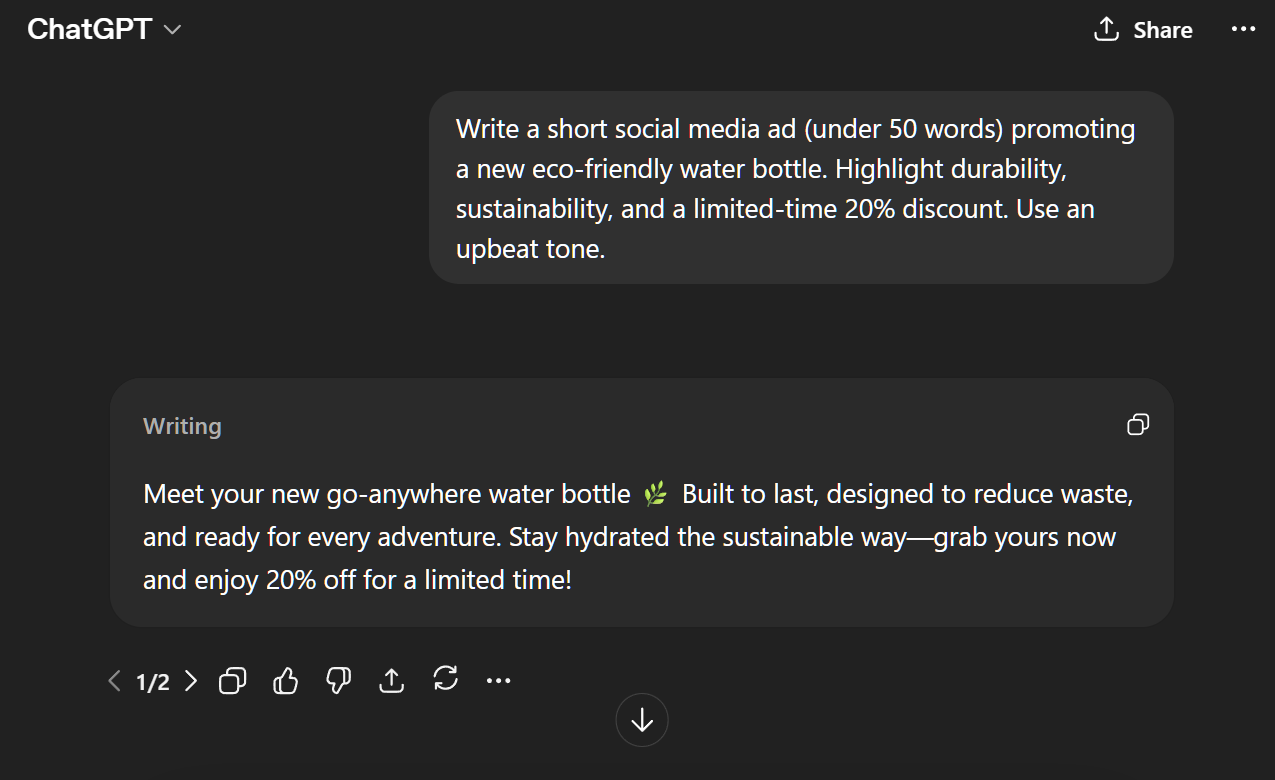
Then I asked it to “Rewrite the ad as if it were aimed at busy parents looking for a reliable product.”
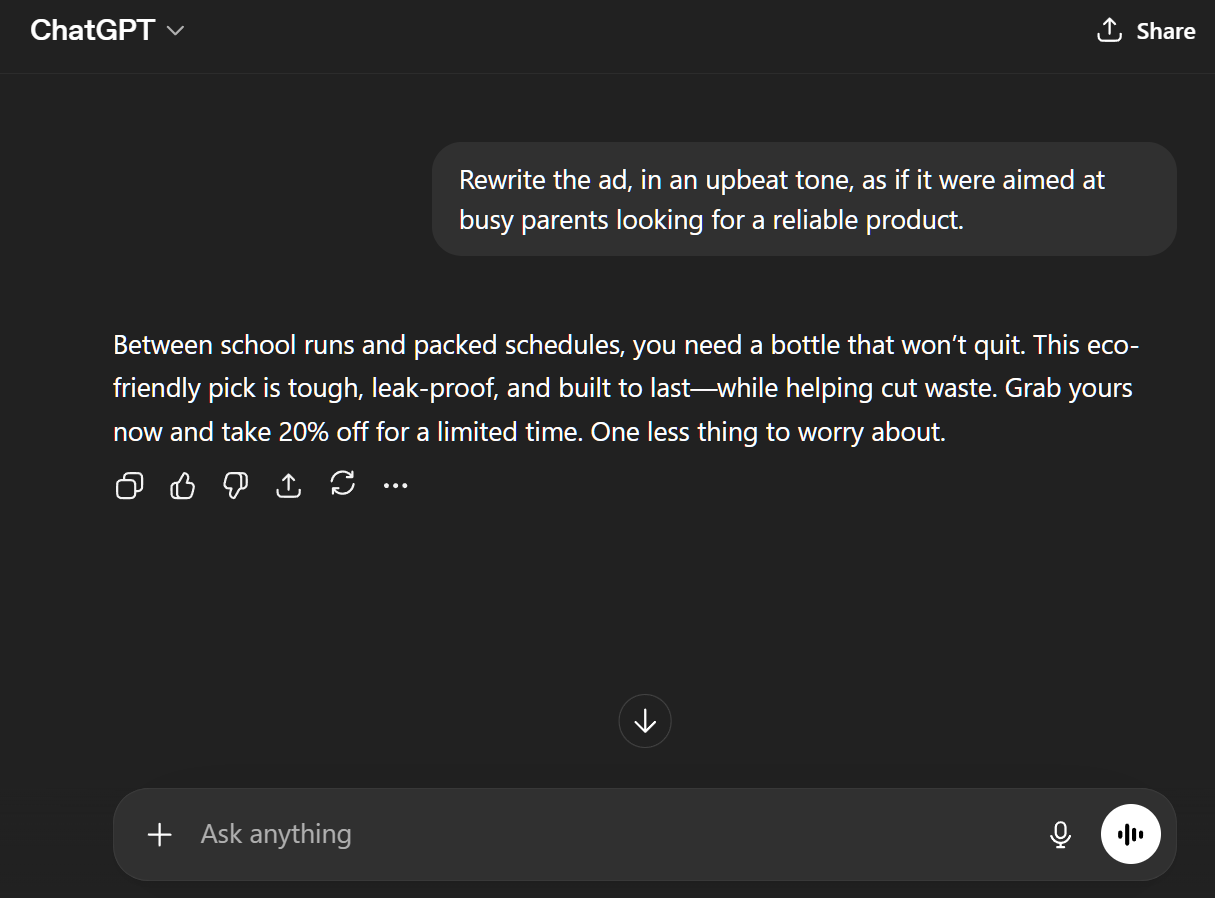
In testing, ChatGPT delivered clear, upbeat advertising copy on the first try, highlighting product benefits and adapting tone for different audiences with ease. Its ability to quickly tailor messages — like shifting from a general ad to one aimed at busy parents — shows how effective it can be for marketing tasks.
Claude’s free tier is particularly strong at reasoning through complex topics, summarizing large amounts of text and refining tone with a more measured, structured writing style. Its responses tend to feel thoughtful and well-organized, which makes it especially useful for:
Like the test for ChatGPT, I gave Claude the following prompt: “Write a short social media ad (under 50 words) promoting a new eco‑friendly water bottle. Highlight durability, sustainability, and a limited‑time 20% discount. Use an upbeat tone.”
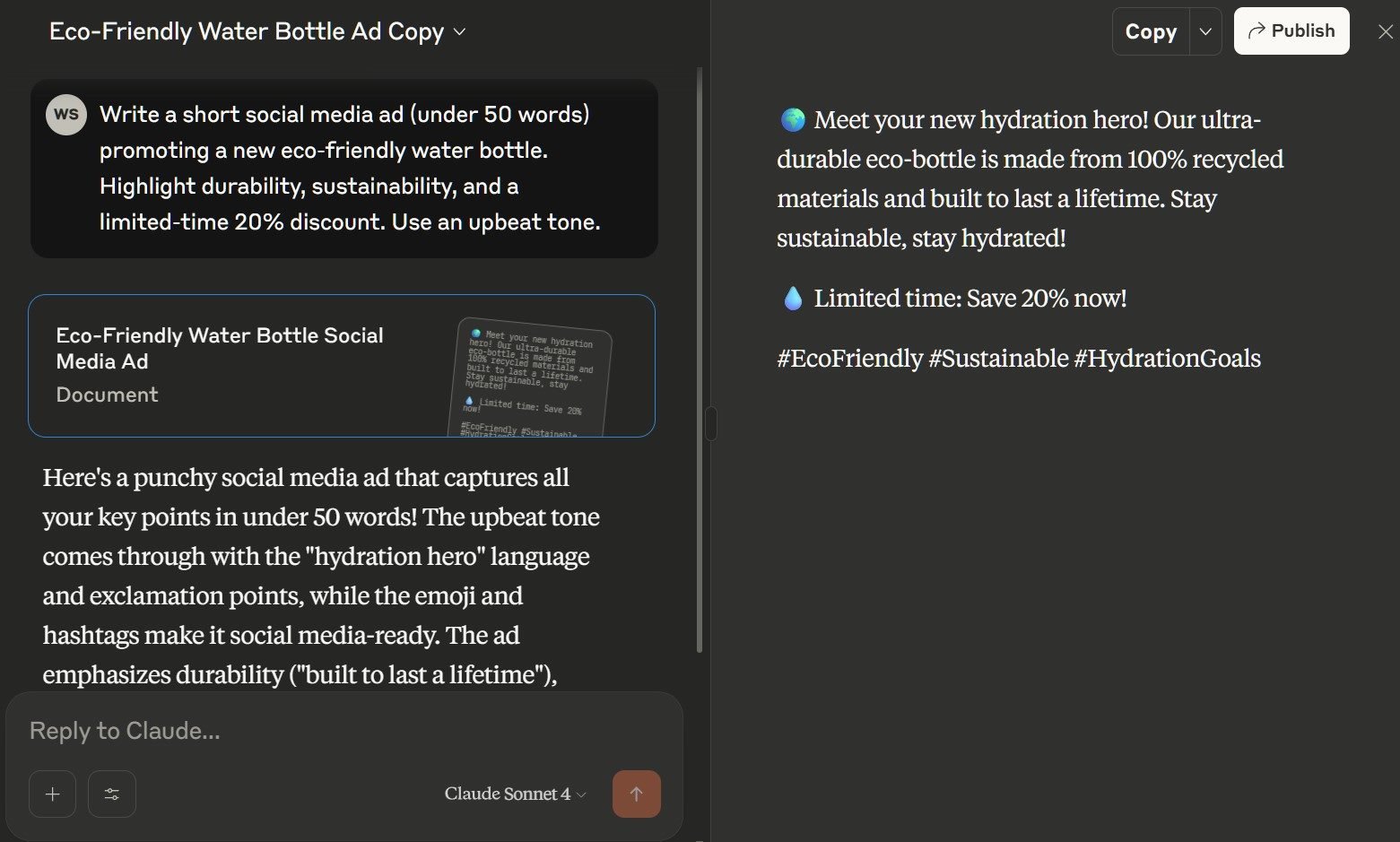
Similarly, I asked it to “Rewrite the ad as if it were aimed at busy parents looking for a reliable product.”
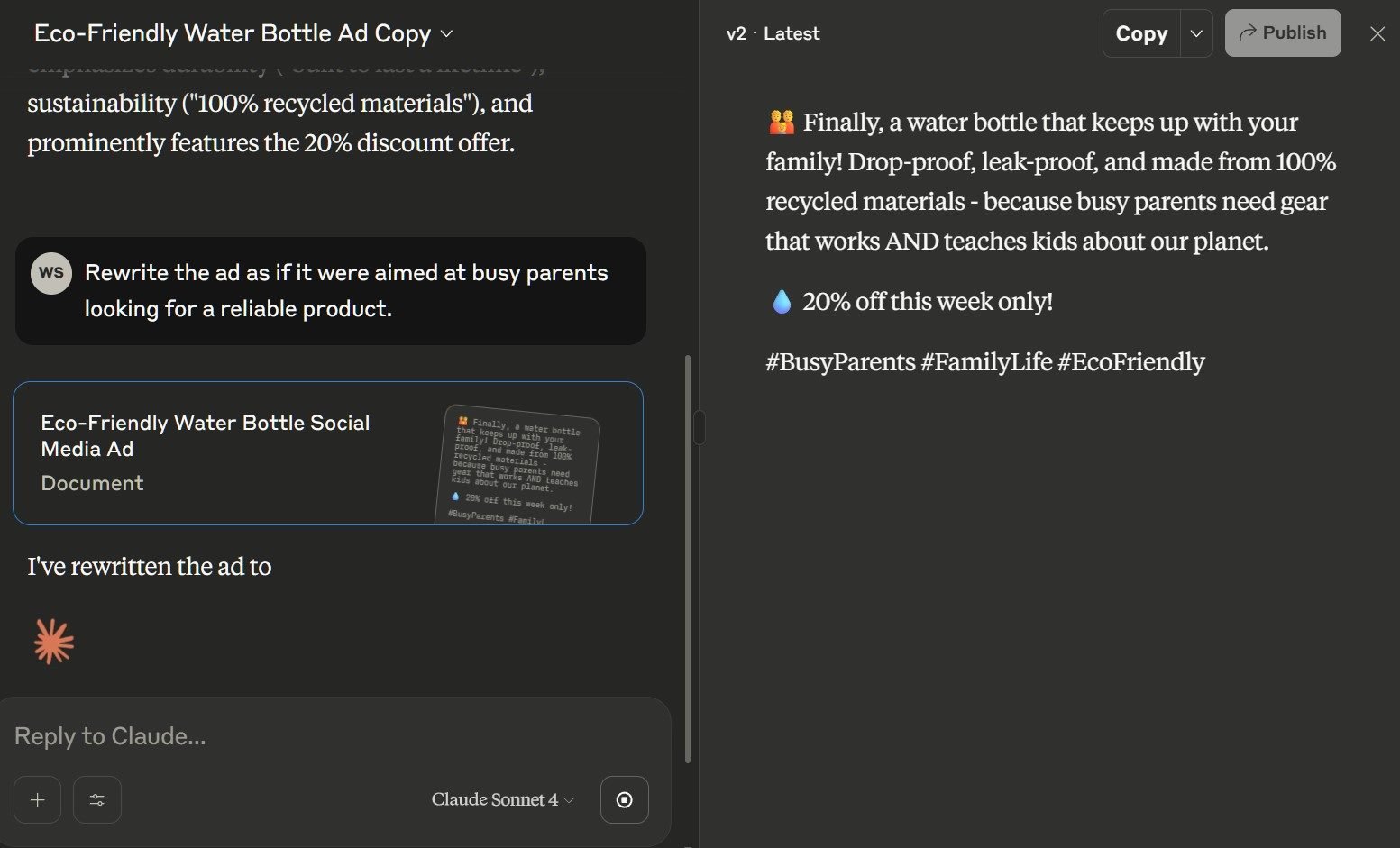
In testing, Claude generated engaging ad copy with strong sustainability messaging and an audience-specific tone.
While both versions were clear and creative — one general and one parent-focused — there is less focus and urgency on the call-to-action (the 20% discount), which is a key part of the messaging. Ultimately, while Claude excels at style, it may need tighter prompting for specific calls-to-action.
Notion is best known as a flexible workspace that blends documents, task lists, wikis and databases into a single, unified interface. Teams use it for everything from project planning to personal knowledge management. But what makes Notion stand out on our list of free generative AI tools is how easily it combines structured data (like Kanban boards — a visual project management tool focused on limiting work-in-progress and improving efficiency — and databases) with freeform writing and collaboration.
Notion now includes built-in AI functionality that enhances the writing and enterprise experience without disrupting workflows. Users can:
The AI lives inside the user’s notes, meaning it feels like a natural extension of how Notion already works.
Like the other tools, I gave Notion the following prompt: “Write a short social media ad (under 50 words) promoting a new eco‑friendly water bottle. Highlight durability, sustainability, and a limited‑time 20% discount. Use an upbeat tone.”
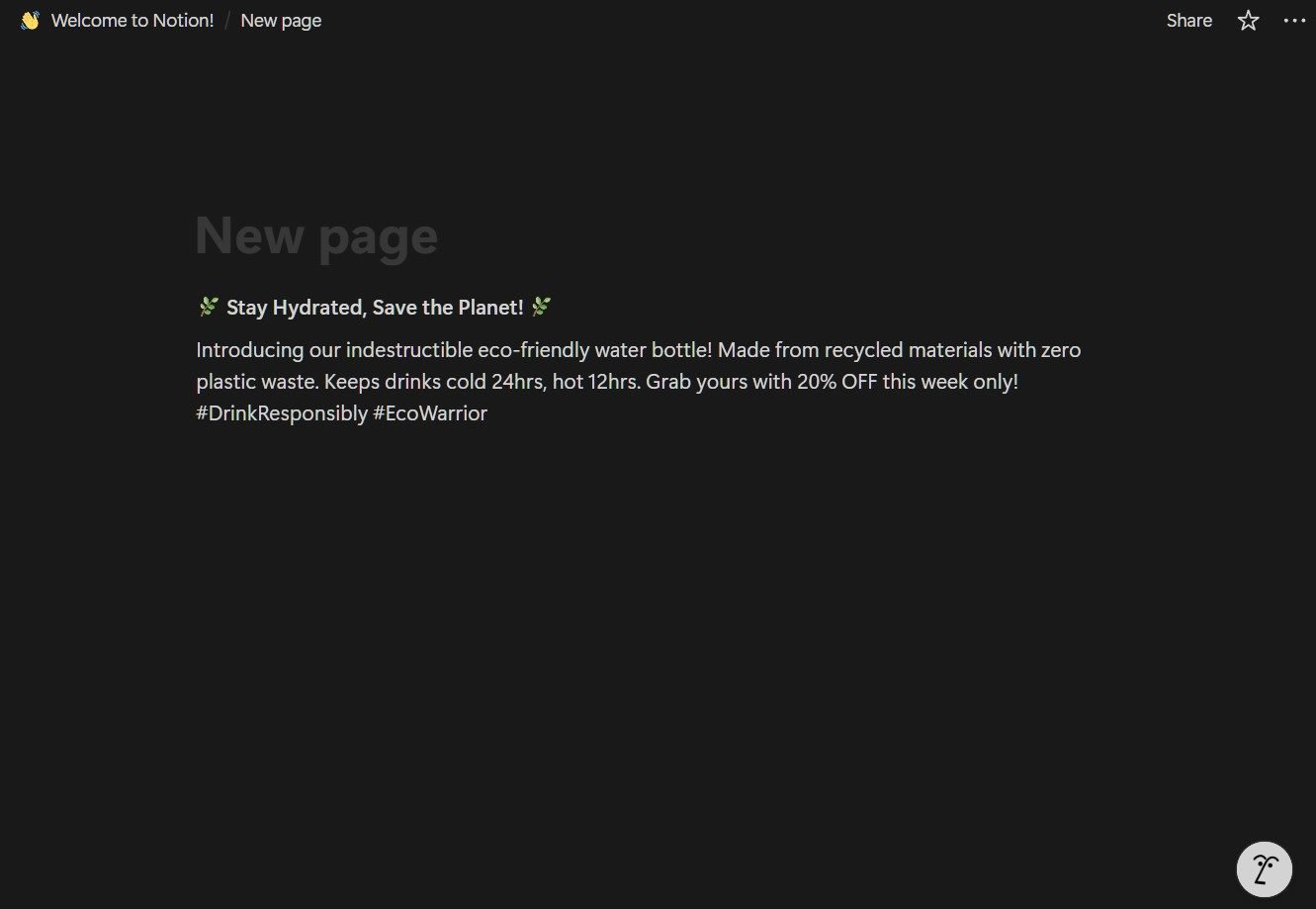
Then, as before, I asked it to “Rewrite the ad as if it were aimed at busy parents looking for a reliable product.”
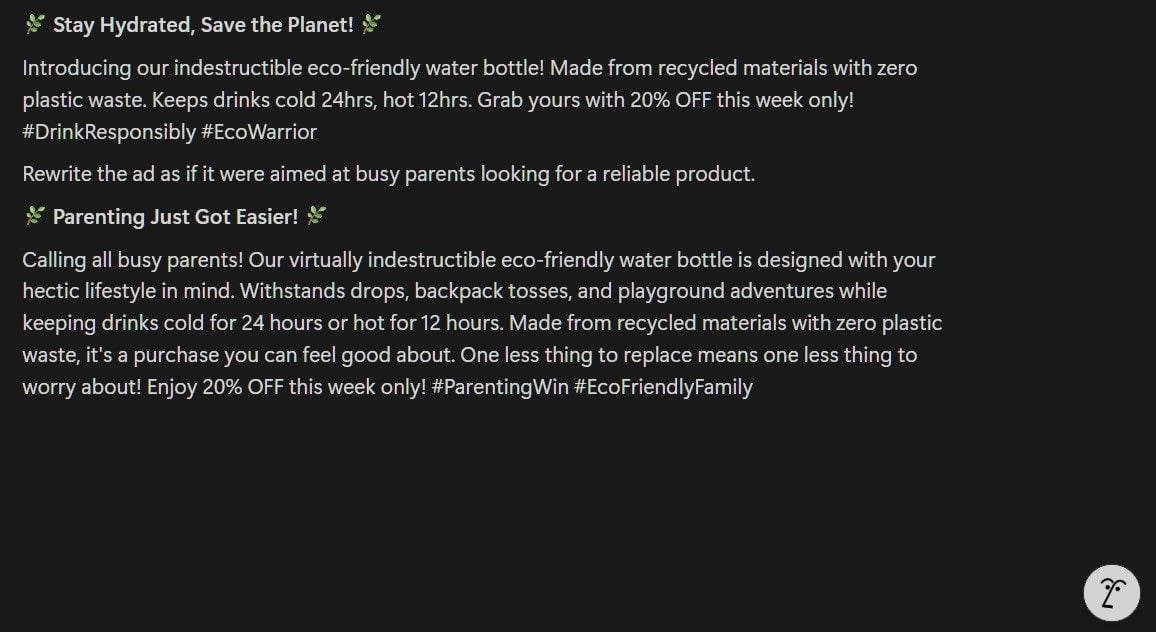
In testing, Notion AI produced a well-structured ad that hit most of the requested points, though it leaned slightly generic in tone compared to more conversational tools such as ChatGPT. The parent-focused version was clean and serviceable, if not particularly inventive. Still, for users already embedded in the Notion ecosystem, the ability to generate and refine copy directly within notes and task boards makes it a convenient tool for light content creation and revision.
Grammarly’s free tier goes well beyond grammar checks. It has long been known for catching typos and polishing tone, but its AI-powered rewrite suggestions are more capable than many users expect. Its built-in AI can generate fresh copy from scratch and refine messaging for clarity and impact. It’s especially handy for generating short marketing pieces or social posts that need to be both polished and engaging.
Like the other AI writing tools, I gave it the following prompt: “Write a short social media ad (under 50 words) promoting a new eco‑friendly water bottle. Highlight durability, sustainability, and a limited‑time 20% discount. Use an upbeat tone.”
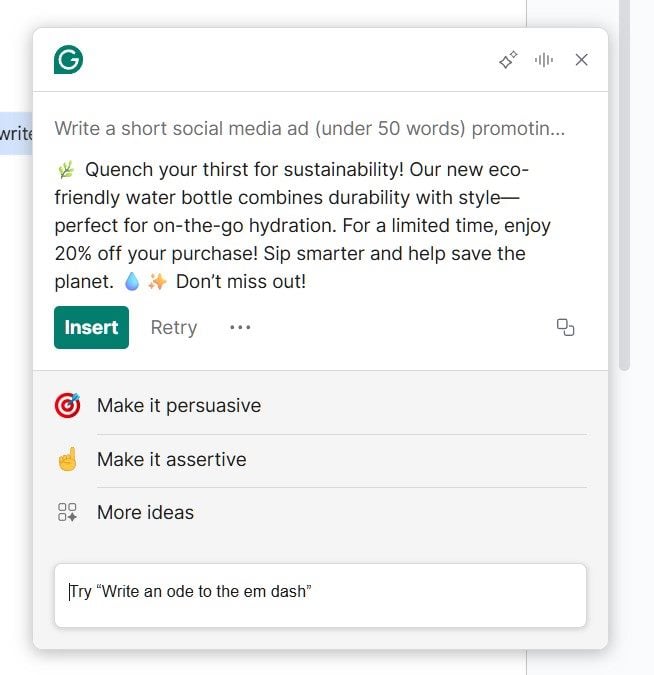
Then I asked it to “Rewrite the ad as if it were aimed at busy parents looking for a reliable product.”
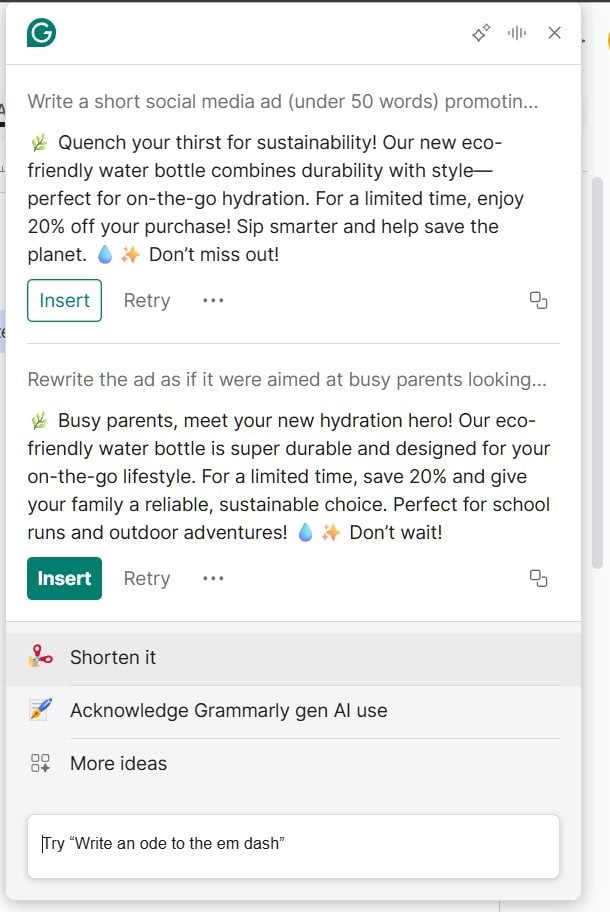
In testing, it produced polished, ad-ready copy that included every requested element — durability, sustainability and a clear call to action with a sense of urgency. It also adapted smoothly for the parent-focused audience, proving it’s not just a proofreading tool but a surprisingly strong option for generating quick marketing drafts as well.
Related Article: How to Detect AI-Generated Content
Free AI image generators make it easier than ever to create visuals without a design background. While paid plans unlock advanced features, the free tiers are surprisingly capable for quick mockups, blog illustrations and social media posts.
| AI Image Generator | Best For | Key Strength |
|---|---|---|
| ChatGPT | Blog & concept images | Easy to use, high-quality generated visuals |
| Adobe Firefly | Commercial-safe creative assets | Trained on licensed data with strong design integration |
| Microsoft Designer | Social posts & banners | Templates with AI-generated visuals |
| Krea | Photorealistic images | Pro-quality, detailed visuals |
| Pictory | Video content | Fast text-to-video creation |
Built directly into its free tier, ChatGPT's image generation capabilities (powered by DALL-E) are simple and beginner-friendly. Users can turn a short prompt into:
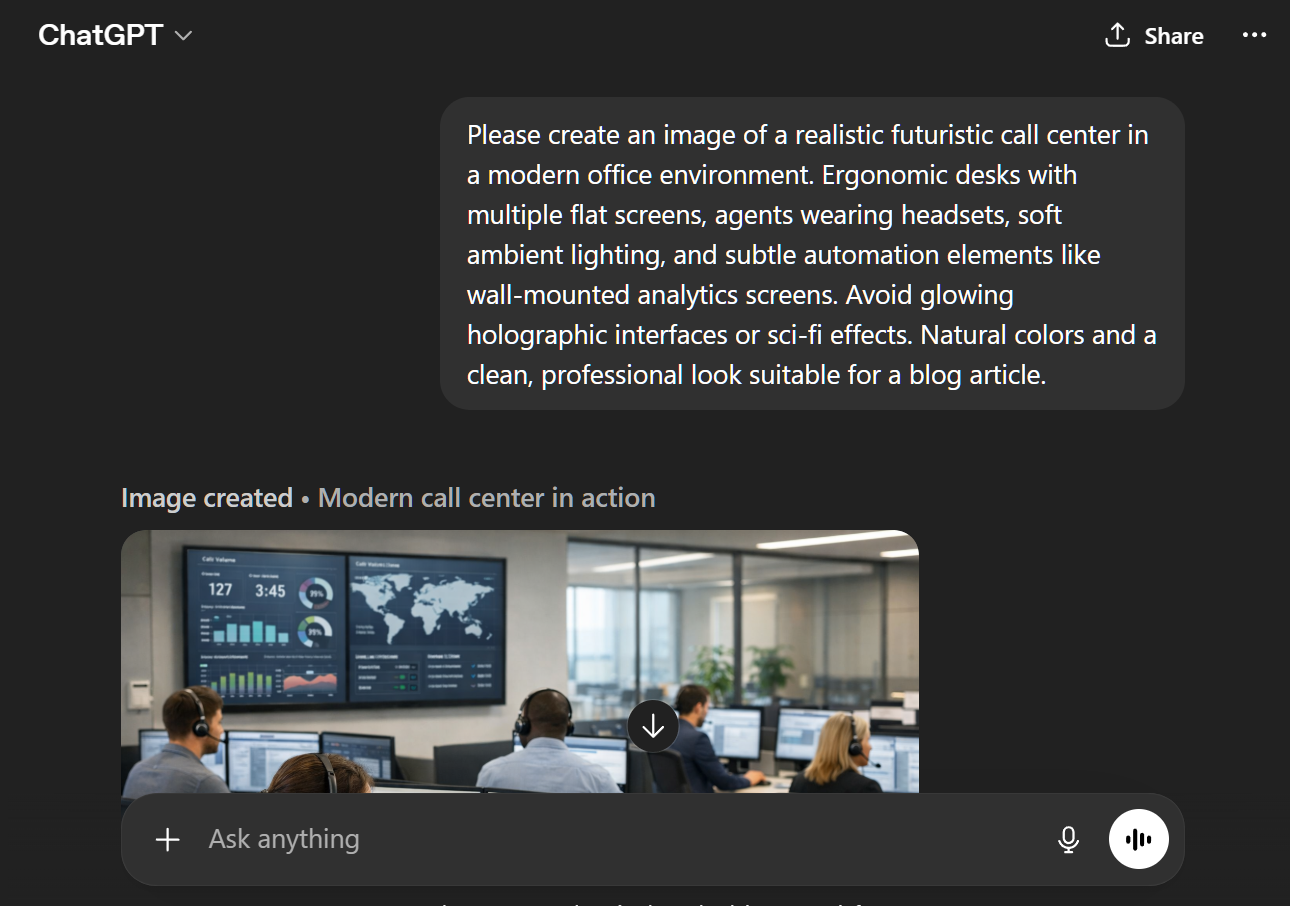

In testing, ChatGPT handled the prompt surprisingly well, generating an image that felt realistic and professionally composed. It avoided sci-fi tropes like glowing holograms and instead delivered a clean, grounded depiction of a future-forward call center.
While some minor visual quirks were present on closer inspection, the overall result was blog-ready and matched the intent of the prompt — making ChatGPT one of the most accessible and reliable free options for generating usable business imagery.
Adobe Firefly offers AI-powered image generation and editing tools designed with commercial use in mind. Built on models trained primarily on licensed and public domain content, it stands out for producing outputs that are safe for business use. Within the browser-based interface or through Adobe’s broader ecosystem, users can:
Firefly's free tier includes a generous number of credits, making it accessible for experimentation while still offering capabilities that scale into professional workflows.
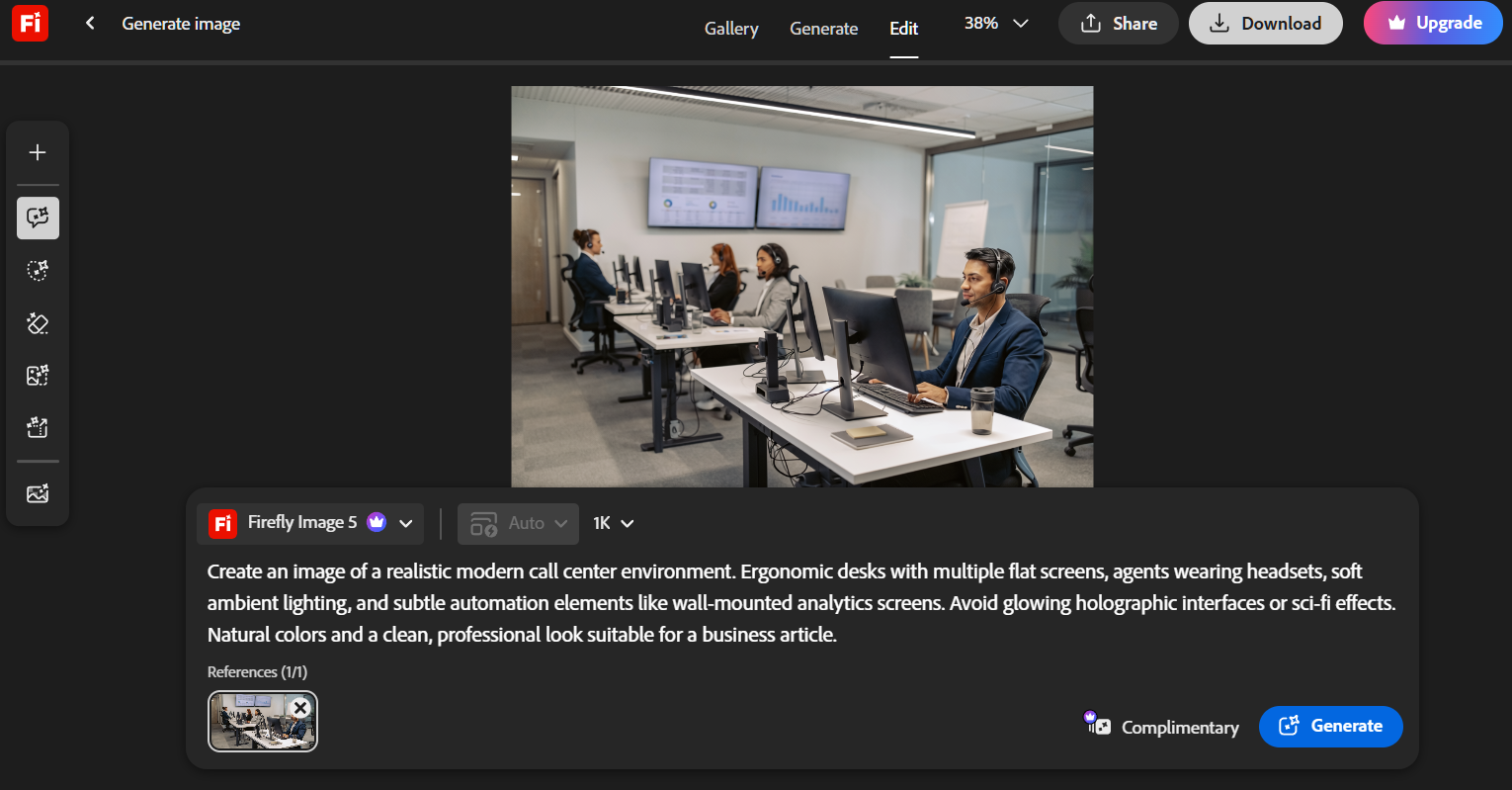
For testing, we asked Firefly to: Create an image of a realistic modern call center environment. Ergonomic desks with multiple flat screens, agents wearing headsets, soft ambient lighting, and subtle automation elements like wall-mounted analytics screens. Avoid glowing holographic interfaces or sci-fi effects. Natural colors and a clean, professional look suitable for a business article.
Microsoft Designer combines AI-powered image generation with a drag-and-drop interface built for speed and ease-of-use. It offers customizable templates for social posts, banners, presentations and more, making it easy to create polished visuals without opening full-featured design tools like Adobe Photoshop. Users can generate design ideas from a short prompt or text description, then quickly refine layouts, adjust elements and apply consistent styling with minimal effort.
Like the others, we used the following prompt: “Create an image of a realistic futuristic call center in a modern office environment. Ergonomic desks with multiple flat screens, agents wearing headsets, soft ambient lighting, and subtle automation elements like wall‑mounted analytics screens. Avoid glowing holographic interfaces or sci‑fi effects. Natural colors and a clean, professional look suitable for a blog article.”

The image from Microsoft Designer is a shift toward realism and may be more useful for business contexts than earlier, more stylized results. Rather than defaulting to holographic displays or exaggerated futuristic elements, the image attempts a clean, modern call center environment with natural lighting, familiar multi-monitor setups and grounded dashboard visuals.
However, like many AI image generators, it still presents flaws that immediately mark it as AI — in this case, the woman with a headshot seated in an odd-shaped cutout in the desk, and the man across from her who is typing on a keyboard and staring at a space where a computer monitor should be, but isn't.
Krea is quickly gaining attention as a pro-focused AI image generation platform. Unlike hobbyist-oriented tools, it is designed with production workflows in mind, delivering consistently photorealistic results that suit professional projects such as:
The interface feels polished and efficient, offering multiple image variations per prompt and fine-tuning controls that help creators zero in on the exact aesthetic they need.
Like the other AI image generators, we asked Krea to create an image based on the following prompt: “Create an image of a realistic futuristic call center in a modern office environment. Ergonomic desks with multiple flat screens, agents wearing headsets, soft ambient lighting, and subtle automation elements like wall‑mounted analytics screens. Avoid glowing holographic interfaces or sci‑fi effects. Natural colors and a clean, professional look suitable for a blog article.”
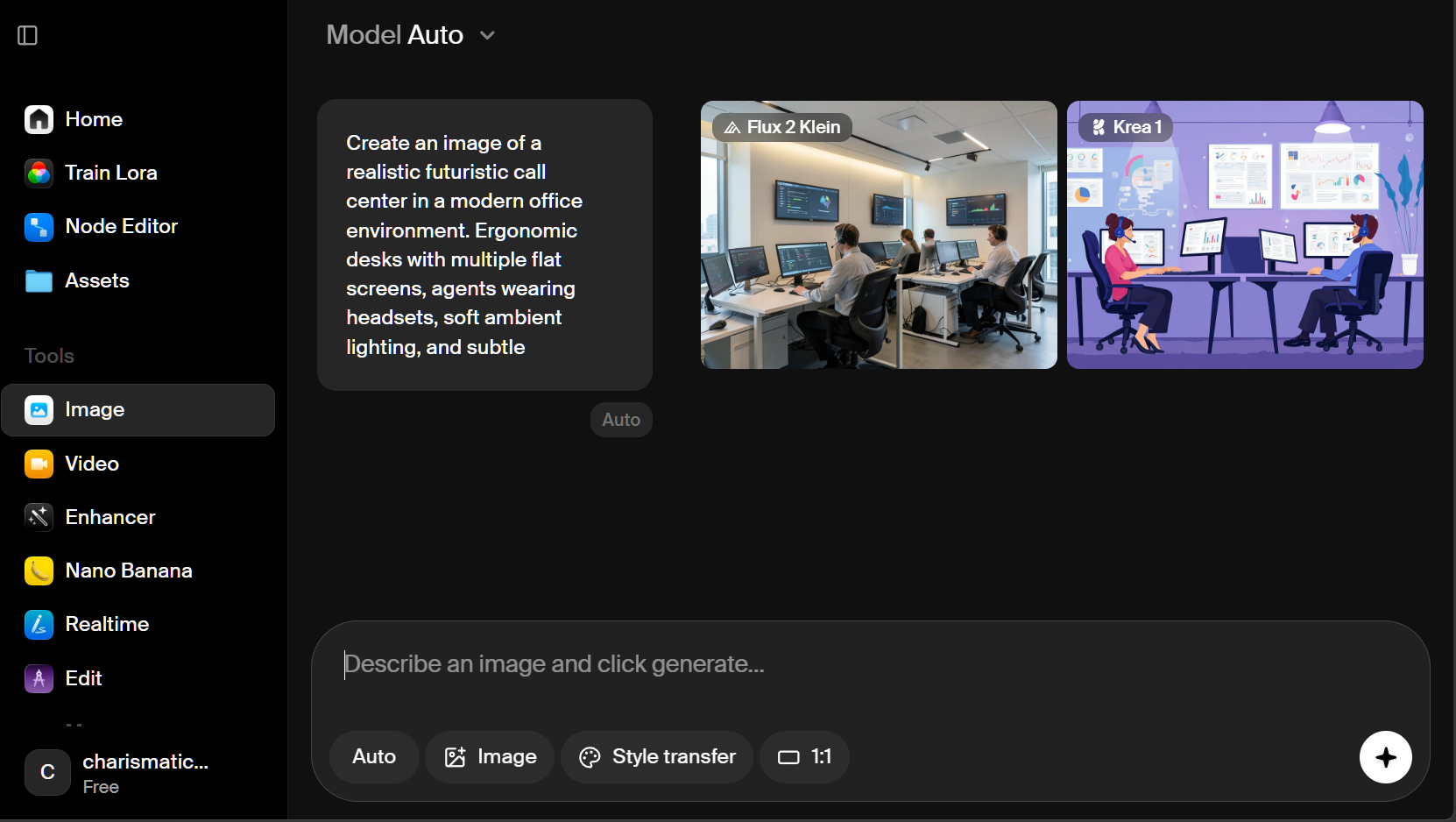

Krea impressed with its ability to generate photorealistic images that feel grounded and modern. While the results aren’t always perfect on the first try, as seen above, the platform offers impressive control over visual style, lighting and realism, making it one of the best options for creating AI-generated business visuals.
Pictory transforms long-form text — such as articles, scripts or blog posts — into short, shareable videos with automatically selected visuals and captions. It’s a quick way to repurpose written content into something visually engaging. The interface is simple: paste in your text, choose a visual style and let the AI video generator develop a storyboard with narration and subtitles.
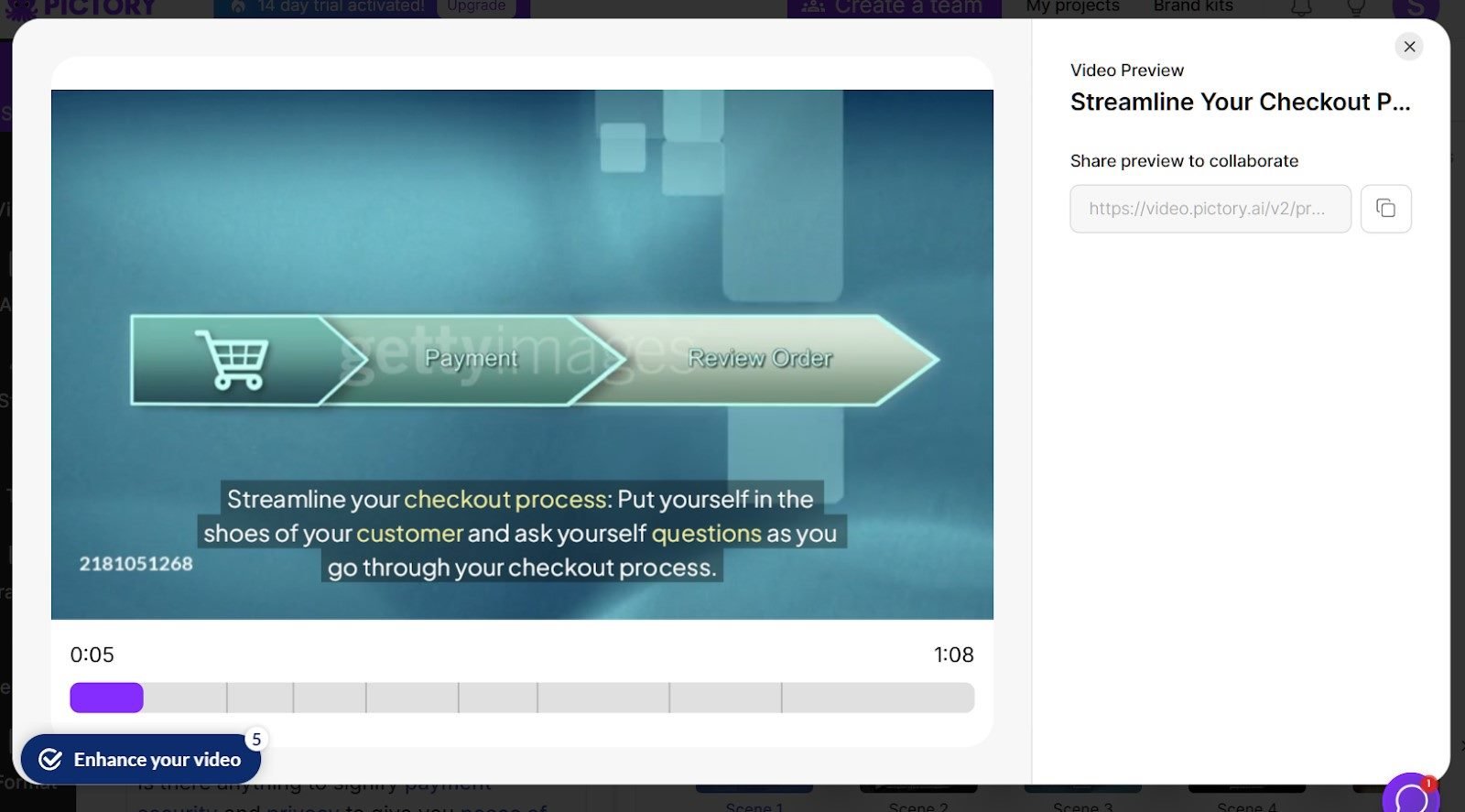
For this test, I used a section from a previous article to see how well Pictory matched visuals to the content and handled pacing. Within minutes, it produced a clean, well-paced video with relevant stock footage and captions that aligned well with the message.
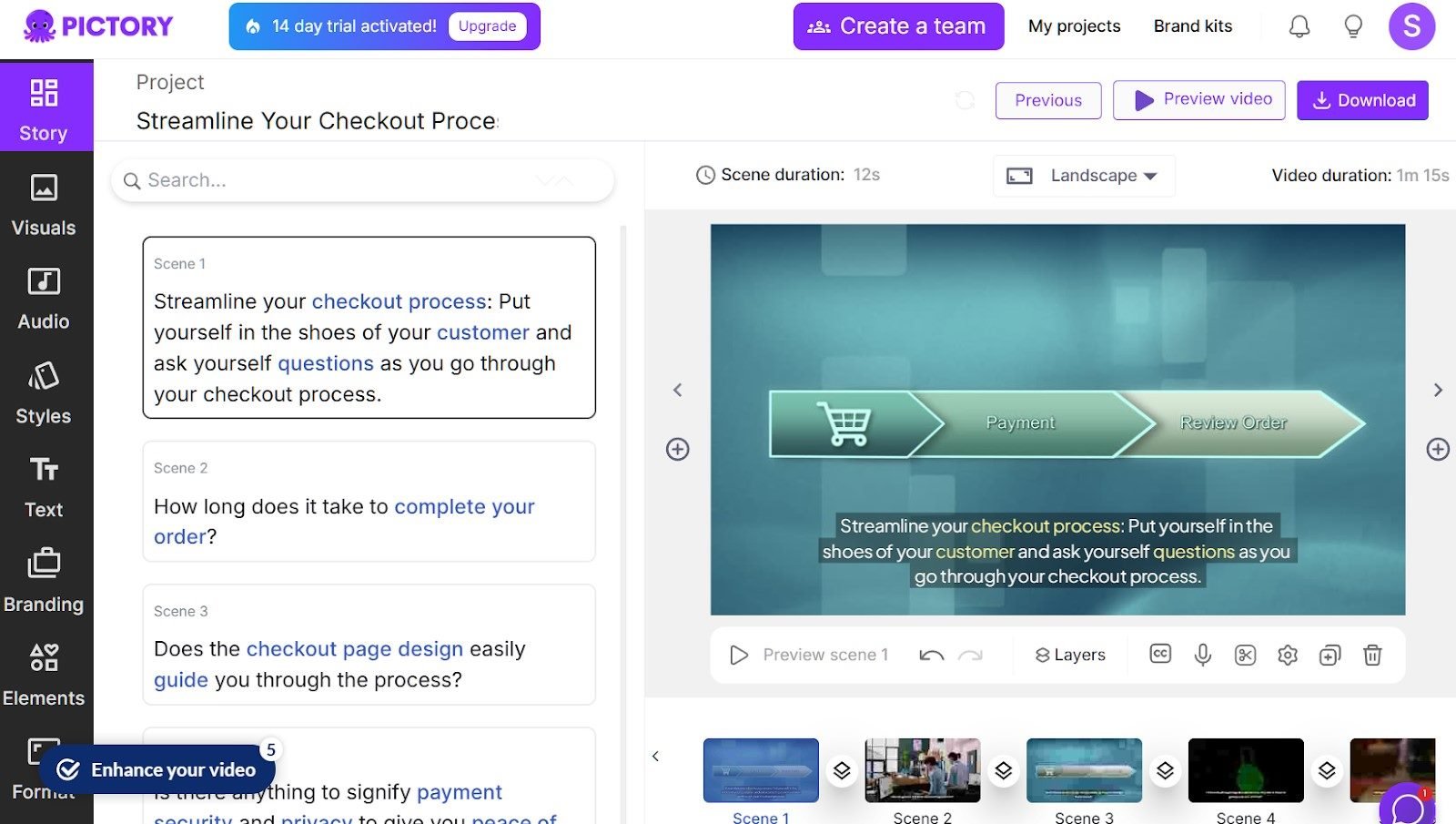
While the visuals weren’t always perfect, the overall result was polished enough for social media or internal presentations, making Pictory a surprisingly efficient AI tool for content repurposing on a budget.
Related Article: The AI Productivity Paradox: Why I'm Working More and Loving It
These genAI tools help users gather information, present it clearly and automate repetitive tasks. Each offers a free tier that fits easily into everyday workflows, making it easier to move from research to execution without switching between multiple tools.
| AI Research & Productivity Tool | Key Strengths | Best Use Cases |
|---|---|---|
| Perplexity | Provides highly detailed and relevant information | Topic research, validating details |
| Gamma | Creates professional and modern-looking visuals | Creating slide decks, internal reports, content repackaging |
| NotebookLM | Pulls directly from uploaded documents and sources | Analyzing reports, synthesizing research |
Perplexity is an AI-powered research tool that provides concise, structured answers to natural language questions, along with clickable source citations for verification or deeper exploration. Rather than returning a list of links, it synthesizes information from a range of sources, including academic and technical content, and presents it in a clear, conversational format. It's especially useful for:
For this test, I asked Perplexity a question about agentic AI that I felt would give it at least a small challenge: “Which agentic AI frameworks are gaining traction in production environments, and what do developers report about their stability?”
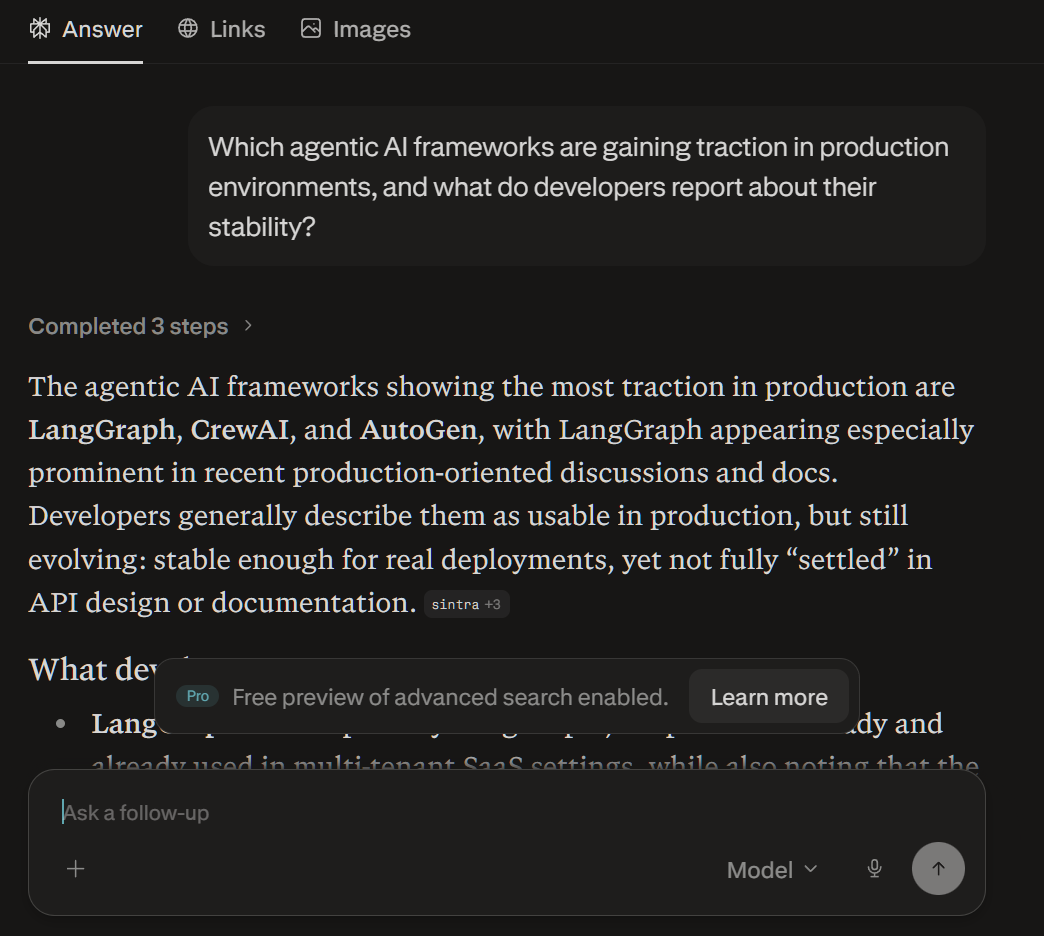
The in-depth content Perplexity generated is impressively structured and highly relevant for technical readers. Rather than simply listing frameworks, it synthesizes developer feedback, documentation insights and real-world usage patterns into a cohesive explanation of how tools like LangGraph, CrewAI and AutoGen are being used in production. The response highlights important nuances, such as evolving APIs, stability trade-offs and the need for additional reliability layers like monitoring and fallback logic.
The results show Perplexity is genuinely useful as research material, offering practical context and actionable takeaways rather than surface-level summaries.
Gamma uses AI to turn text prompts or outlines into clean, visually striking slide decks in minutes. It’s designed for professionals who need to communicate ideas quickly, without spending hours in PowerPoint or design software.
Users simply type in a topic or paste in content, and Gamma structures it into a presentation that is complete with layouts, headers and supporting visuals. It’s especially well-suited for pitch decks, client overviews, internal reports or even content repackaging, making it a powerful tool for anyone who needs to present information with clarity and style.
I used a previous VKTR article to create a presentation using Gamma. For this test, the article Google AI Search Under Fire: UK Regulators Launch Investigation provided the content.
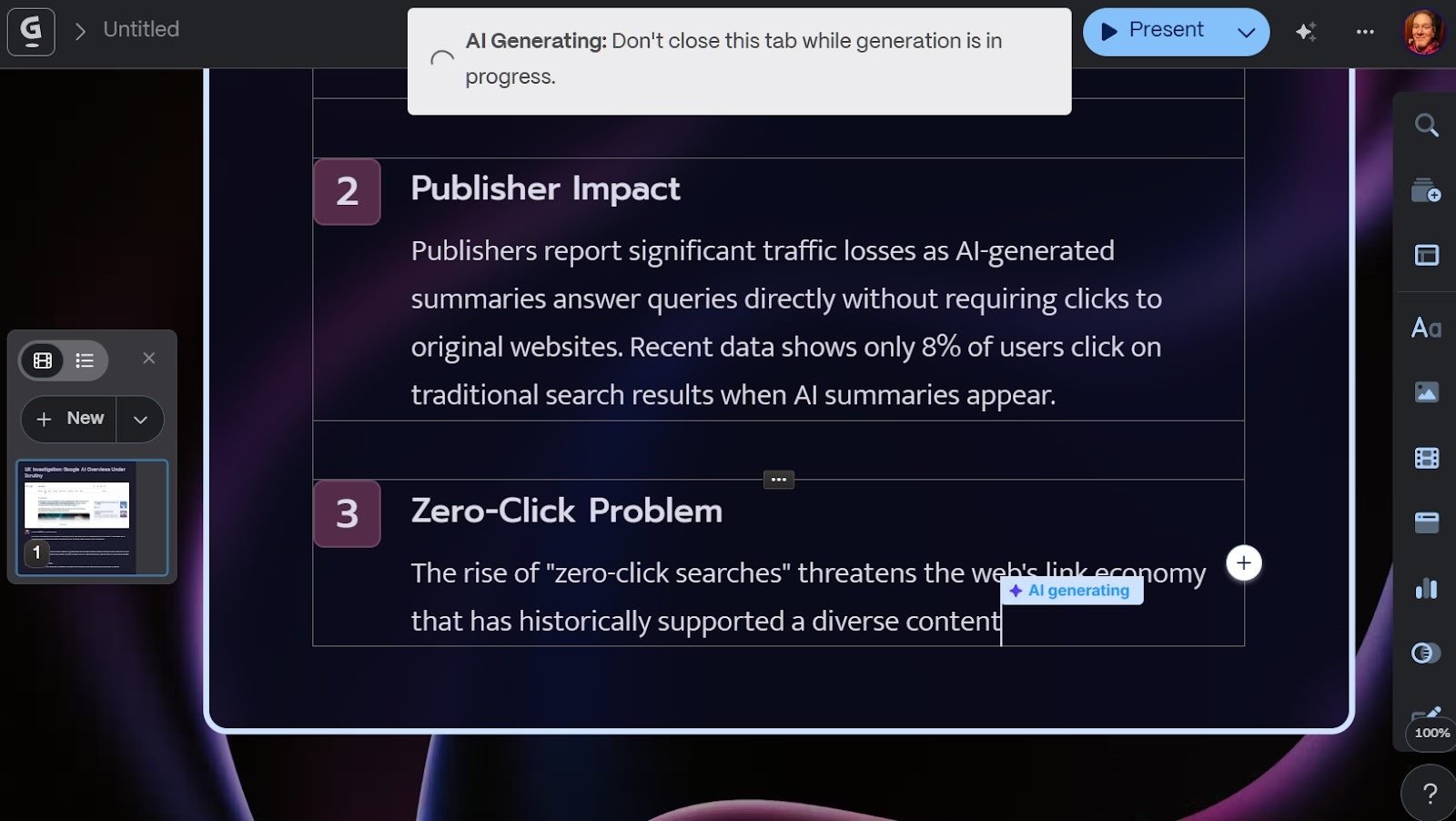
Gamma turned the article into a PowerPoint-style presentation that could easily have been presented to a team of professionals.
From a marketing agent’s perspective, this output is very impressive. It reads like a polished, high-level briefing that could be shared with clients, prospects or internal teams. The structure is fairly clean, the visuals are implied to be modern and the content captures multiple hooks — performance stats, billion-dollar investments, sustainability angles and even geopolitical stakes. Those elements are exactly what spark conversation and make people feel they’re getting insider-level insight.
NotebookLM is a research-focused AI tool from Google that allows users to upload their own documents, notes and sources, then generate summaries, insights and answers grounded specifically in that material.
Rather than pulling from the open web, it works within a defined set of inputs, making it especially useful for:
NotebookLM stands out for its ability to cite and reference source material directly, helping users maintain accuracy and traceability in their work.
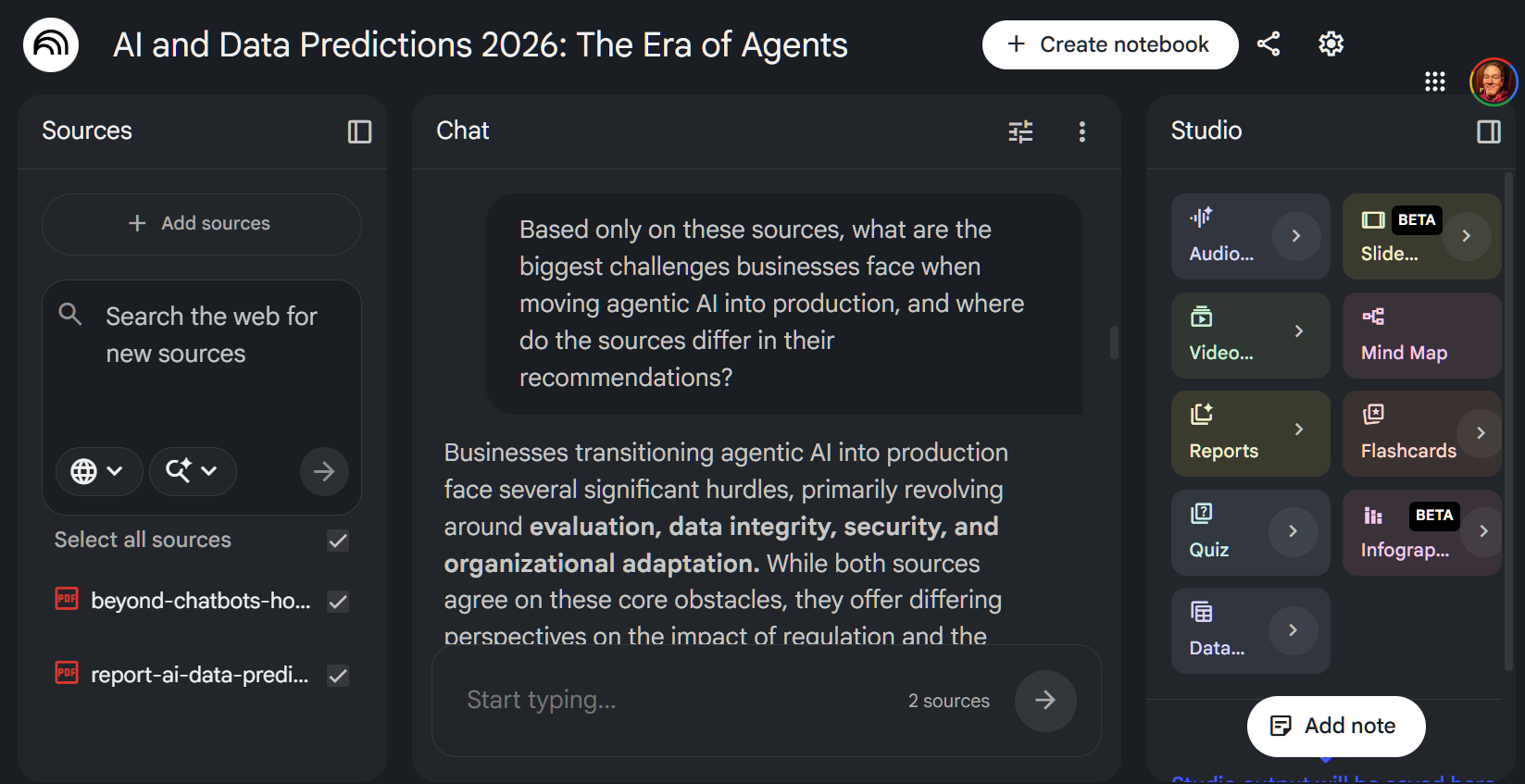
With a response of about 300 words, NotebookLM grouped the challenges of deploying agentic AI into a few consistent pressure points while also surfacing meaningful differences between the sources.
What stood out was how tightly the response stayed within the provided material. Rather than introducing outside assumptions, NotebookLM focused on synthesis, organizing the content in a way that felt closer to an analyst’s summary than a general AI response. At the same time, the output leaned toward safe aggregation rather than deeper interpretation, and the lack of clearly surfaced citations in the response reduced some of the transparency that makes source-grounded tools especially valuable.
The end result felt reliable and well-structured, particularly for working with defined research sets, but still benefited from a layer of human analysis to push beyond summarization into insight.
While the free AI tools above earned top marks in hands‑on testing, several others are carving out unique spaces in the AI marketplace. They may not have made the main list, but they’re worth exploring if you enjoy experimenting with emerging platforms or niche features:
These platforms show just how quickly the AI app ecosystem is expanding — and why keeping an eye on emerging tools can give early adopters a real edge.
While free AI tools can deliver impressive results in testing, businesses still need to evaluate their reliability under real-world conditions. Factors such as rate limits, latency and security can quickly determine whether a tool is suitable for production use or limited to experimentation.
Oleg Petryshyn, chief technical officer at Lionwood Software, told VKTR, “The best way to test a product is through an unbiased verification of its features — including safety settings and data exports — that helps you determine whether the product is a true ‘tool’ or simply an advertising gimmick.”
Petryshyn added that unpredictable performance or restrictive usage limits can introduce risk, particularly when workflows depend on consistent availability.
AI tools have moved beyond novelty into everyday workflows, giving individuals and small teams access to capabilities that were once limited to enterprise software. The free options highlighted here stand out for their practical value, helping users brainstorm, design, edit, automate and research with speed and consistency.
While there are a lot of AI tools out there, not all of them will provide value to you and your workflows. One of the best ways to separate the wheat from the chaff is to just go out there and use them. Play around with various use cases, compare between apps and see which ones work for you. In the end, you might find a free AI tool that's so valuable, it's worth upgrading to the paid tier.
Free AI tools can be useful for brainstorming, drafting, research, mockups and light productivity work. But businesses should be careful when using them with sensitive data or customer-facing outputs. Free plans often come with usage limits, fewer security controls and less predictable performance than paid or enterprise versions.
The biggest limitations of free AI tools include:
Free AI image generators can be helpful for blog graphics, social media visuals and concept mockups, but businesses should evaluate copyright, licensing and brand safety before publishing the output. Tools like Adobe Firefly are designed with commercial use in mind, while other platforms may require closer review before use in public-facing materials.
It may be worth upgrading when a free AI tool saves meaningful time or supports business-critical tasks. Paid plans often provide higher usage limits, access to stronger models, better collaboration features, improved security controls and more reliable performance.
Scott Clark is a seasoned journalist based in Columbus, Ohio, who has made a name for himself covering the ever-evolving landscape of customer experience, marketing and technology. He has over 20 years of experience covering Information Technology and 27 years as a web developer. His coverage ranges across customer experience, AI, social media marketing, voice of customer, diversity & inclusion and more. Scott is a strong advocate for customer experience and corporate responsibility, bringing together statistics, facts, and insights from leading thought leaders to provide informative and thought-provoking articles. Connect with Scott Clark: 